GPT-6.1 Sol API pricing: calculate cache and long-context costs
Calculate GPT-6.1 Sol API costs with separate token buckets, long-context thresholds, processing modes, worked examples, and a downloadable offline calculator.
 Ofox
Ofox 
GPT‑6.1 Sol’s Standard API rates are $2 for input and $10 for output per million tokens, but those two numbers are not enough to budget an agent. Cache reads, cache writes, long prompts, processing modes, and tool charges can change the bill. This guide shows how to calculate a request and reconcile a group of requests without counting the same tokens twice.
Prices were checked against OpenAI’s model page and API pricing on September 30, 2026. All calculations below are hypothetical USD examples, not customer invoices or measured model usage. They cover OpenAI list pricing, not an Ofox offer or ChatGPT subscription credits.
Start with four token buckets
| Standard, at most 272,000 input tokens | USD per 1M tokens |
|---|---|
| Ordinary, uncached input | 2.00 |
| Cache reads | 0.10 |
| Cache writes | 2.50 |
| Output, including billable reasoning tokens | 10.00 |
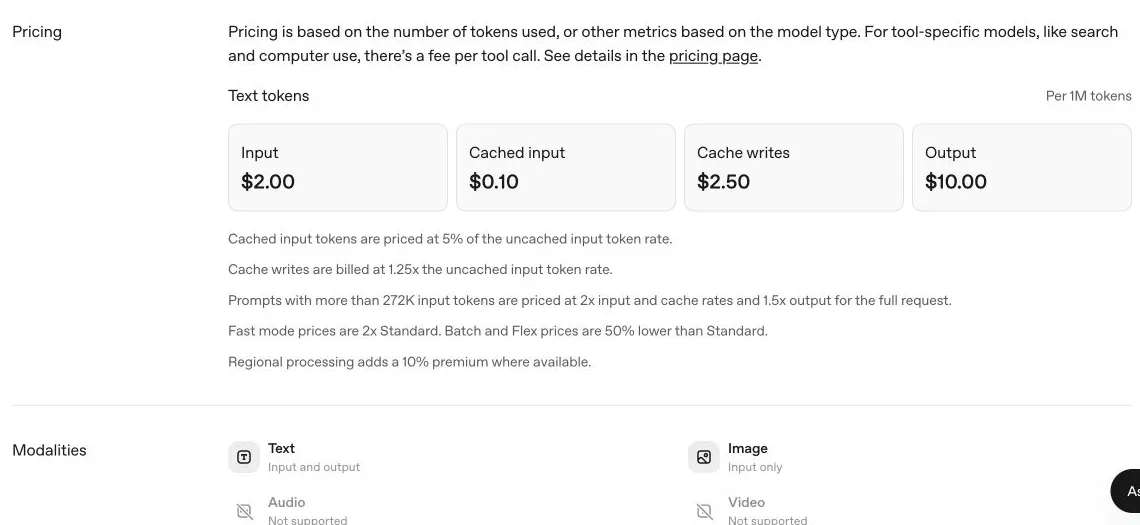
Real screenshot of the English OpenAI documentation. It records published pricing; it is not a bill or a completion test.
Use mutually exclusive input buckets: ordinary input U, cache reads R, and cache writes W. Output is O. In Standard short-context processing, the estimate is:
USD = (2 × U + 0.10 × R + 2.50 × W + 10 × O) / 1,000,000If an API field reports total input that already includes cached tokens, do not bill the total at $2 and then add the cache charge. Map the endpoint’s usage fields to exclusive categories first. A missing breakdown is unknown, not evidence that a bucket is zero. The calculator supplied below deliberately accepts explicit buckets rather than guessing from arbitrary provider responses.
Reasoning tokens are another common double count. When output usage already includes reasoning, adding the reasoning detail again overstates the bill. Conversely, counting only the visible answer can understate it. Keep the provider’s total billable output value and use its details only to explain the total.
The long-context threshold changes the whole request
For prompts with more than 272,000 input tokens, OpenAI lists 2× input and cache rates and 1.5× output rates for the full request. The premium is not restricted to the tokens above 272,000. Exactly 272,000 remains on the short-context side of this documented condition.
| Standard long-context bucket | USD per 1M tokens |
|---|---|
| Ordinary input | 4.00 |
| Cache reads | 0.20 |
| Cache writes | 5.00 |
| Output | 15.00 |
Treat the full prompt’s input-token count as the threshold test, not just its uncached portion. A prompt with 20,000 ordinary input tokens and 260,000 cache-read tokens has 280,000 input tokens. Budgeting it as a short prompt because only 20,000 tokens are new would produce the wrong estimate.
For example, 300,000 ordinary input tokens and 10,000 output tokens cost 300,000 × 4 / 1M + 10,000 × 15 / 1M = $1.35. Applying short rates would give $0.70, which is not the documented price for that request. This is why an agent’s growing history can matter more than the original user prompt.
The model’s 1,050,000-token context window does not mean all of that can be supplied as input. The model documentation separately lists maximum input and output limits. Reserve output capacity, include tool definitions and returned tool data in the budget, and measure actual token usage rather than translating characters into an exact token count.
Four worked budgets
These examples use the same explicit categories as the calculator. They omit tax, tool calls, storage, and any regional premium.
| Scenario | U | R | W | O | Standard USD |
|---|---|---|---|---|---|
| Short uncached request | 20,000 | 0 | 0 | 5,000 | 0.090 |
| Reused reference material | 10,000 | 100,000 | 0 | 5,000 | 0.080 |
| Initial cache-write request | 10,000 | 0 | 100,000 | 5,000 | 0.320 |
| Long uncached request | 300,000 | 0 | 0 | 10,000 | 1.350 |
The second and third rows describe different requests. You cannot count the initial write as a read before a reusable cache exists. For a sequence consisting of one write request and nine matching read requests, the hypothetical total is $0.32 + 9 × $0.08 = $1.04. Ten uncached requests with 110,000 input and 5,000 output tokens each would cost $2.70. That difference assumes every one of the nine reads actually hits the cache and that the supplied bucket classification matches billing.
This is a workload example, not a promise of savings. A changed prefix, routing difference, expiration, or uncacheable request can remove the expected benefit. A repeated request may also produce a different output length. Record misses and writes alongside hits instead of applying the read rate to all repeated text.
Check whether a cache can actually be reused
The current prompt-caching guide uses prompt_cache_options.ttl with "30m" for this model generation, rather than the older prompt_cache_retention setting. It describes a minimum cacheable prefix of 1,024 visible input tokens and retention for at least 30 minutes after the most recent write or reuse. Treat that as a retention condition, not a guarantee that an unrelated or changed request will hit the same cache.
Caching can use implicit or explicit boundaries. In explicit mode, omitting the required breakpoint means no cache is written. Keep stable shared material before changing request-specific material, verify the actual cache usage, and include the first write in your budget. A short gap between calls alone is insufficient evidence of a cache hit.
Standard, Fast, Batch, and Flex
OpenAI lists Fast at 2× Standard and Batch and Flex at 50% below Standard. Treat these as alternative processing modes, not stackable coupon codes. Confirm that the chosen endpoint, model, and workload are eligible for the mode. In particular, do not present Batch as an interactive request with an automatic discount or assume Flex has the same latency guarantees as Standard.
For the $0.09 uncached example, the corresponding token-only estimate is $0.18 in Fast and $0.045 in Batch or Flex. For the $1.35 long-context example, the figures are $2.70 and $0.675. Those comparisons hold token quantities constant; a different model response can change the quantities.
Regional processing has a 10% premium where available. Apply it only to a request actually using that eligible regional option. The model page also says Fast is unavailable with EU data residency. Do not combine incompatible options just because each individual multiplier appears in a pricing table.
Use the offline calculator
Download the Python calculator. It uses Python’s standard library, makes no network calls, and requires no API key. Save it locally and run:
python3 cost_calculator.py --ordinary 10000 --read 100000 --write 0 --output 5000 --mode standardThe expected token estimate is 0.080000 USD. Change --mode to fast, batch, or flex to compare supported pricing modes; --regional applies the documented premium as a budgeting option, not an eligibility check. The script rejects negative counts and incompatible --region eu --mode fast. Its arithmetic was tested locally; it has not been reconciled against a paid GPT‑6.1 Sol call in this article.
The calculator is intentionally small enough to inspect. Its rate table is dated, not auto-updating. Recheck official pricing before using it for a later budget, and keep the version used with the estimate. It reports token charges only: a zero tool charge in this script means “not included,” not “all tools are free.” It does not validate context or output capacity; a numerical estimate is not proof that a request fits the model’s limits.
Reconcile an agent run instead of one message
A user task may create several model requests. Each request can resend instructions, history, tool definitions, and tool results, so multiplying the first request by the visible number of messages is unreliable. Use a request-level ledger:
task_id, request_id, model, timestamp, mode, region,
input_total, ordinary_input, cache_read, cache_write,
output_total, reasoning_detail, tool_type, tool_quantity,
token_estimate_usd, tool_charge_usd, billing_adjustment_usd
For each row, check that exclusive input buckets reconcile to the total. Check the long-context threshold separately for that row. Keep output total separate from its reasoning detail. Add actual tool quantities at their applicable rates, then aggregate by task ID. Preserve request IDs so discrepancies can be investigated without saving private prompts.
Run this ledger over successful requests, failed attempts that generated billable usage, and retries. Do not assume every failed HTTP request is charged; inspect usage and billing evidence. Equally, do not remove an attempt solely because no useful final answer reached the user. Your business metric is cost per accepted task, which requires an acceptance outcome as well as a bill.
When the estimate and the bill disagree
Start with units and scope: dollars versus credits, per million versus per thousand, API versus subscription, and one request versus an entire agent task. Next inspect cache classification and whether total input was counted twice. Then check prompt size, processing mode, regional setting, and output/reasoning accounting. Finally examine tool charges, repeated attempts, and any provider-specific markup or adjustment.
A gateway can have its own prices and usage presentation. This article does not infer an Ofox discount from OpenAI’s rates. Verify the exact model and current catalog before choosing a provider, and keep provider charges separate from this reference calculation.
For choosing between model tiers, continue to Sol versus Astra. For the changes required in an existing application, use the upgrade guide and the Responses tool migration walkthrough. None of those decisions can be settled by the input rate alone.