GPT-6.1 Sol: what changes, what it costs, and how to migrate
Compare GPT-6.1 Sol with GPT-6 Sol, calculate API costs, update reasoning and tool calls, and use a practical checklist to decide whether to migrate.
 Ofox
Ofox 
GPT-6.1 Sol is worth evaluating if GPT-6 Sol already handles your coding or multi-step work, but it is not a model-name-only upgrade for every application. The main compatibility changes are the removal of none reasoning and the requirement to use Responses for tool calling. Its ordinary input and output token rates match GPT-6 Sol; the published cache-read rate is lower.
OpenAI dated its GPT-6.1 Sol system-card addendum September 29, 2026. This guide is for developers and teams deciding how to adopt that release. It separates documented capabilities from a proposed evaluation procedure: we have not run a paid GPT-6.1 Sol benchmark or verified a successful Ofox inference request for this article.
Jump to access, compatibility, cost examples, migration steps, or the decision worksheet.
Where can you use GPT-6.1 Sol?
The official API model identifier is gpt-6.1-sol. In the consumer products, check ChatGPT Work or Codex, rather than assuming every regular Chat conversation has the same model menu. OpenAI describes access as a rollout for eligible paid plans, subject to workspace settings. Enterprise and Edu administrators may need to enable it. Standard and Fast are listed for Sol; the launch resources describe Sol Ultrafast as forthcoming. These are product-access statements, not a promise that a particular account already has access. See OpenAI’s launch resources and Work and Codex availability.
For a developer, three separate checks matter: whether the vendor released the model, whether your provider exposes it, and whether your credentials can call it. A model appearing in a menu settles only part of that question. A saved request using another model can also make a successful-looking test misleading; record the model returned by the API and the provider you used.
Ofox availability at the time of checking
On September 30, 2026, our read-only check of the Ofox public model catalog returned 154 entries and reported a total of 154. GPT-6 Sol was present, but no GPT-6.1 Sol entry was found. That establishes what this public catalog exposed at that moment; it does not prove that every private route or future deployment lacks support.
Do not replace an Ofox model ID with a guessed openai/gpt-6.1-sol and treat this article as confirmation it works. Check the Ofox model catalog page for the exact identifier, supported endpoint, and current provider terms before configuring it. The executable request examples below target OpenAI directly and require an OpenAI API key. A ChatGPT subscription or Ofox key is not interchangeable with that key.
What changes from GPT-6 Sol?
OpenAI positions the new Sol close to Astra for demanding coding, computer use, and professional tasks. That positioning is a reason to test it on your workload, not evidence that it beats Astra on every problem. In particular, a model-level capability does not supply the browser session, files, connectors, or permissions your application must provide.
| Integration decision | GPT-6 Sol | GPT-6.1 Sol |
|---|---|---|
| Reasoning effort | Includes none | low, medium (default), high, xhigh, max; no none or minimal |
| Chat Completions function calling | Available with none | Use Responses instead |
| Text and image understanding | Text/image input, text output | Text/image input, text output |
| Context window / maximum output | 1,050,000 / 128,000 tokens | 1,050,000 / 128,000 tokens |
| Standard short-context input / output | $2 / $10 per million tokens | $2 / $10 per million tokens |
| Cached input | $0.20 per million tokens | $0.10 per million tokens |
Sources: the current GPT-6 Sol specification, GPT-6.1 Sol specification, and GPT-6 migration guide.
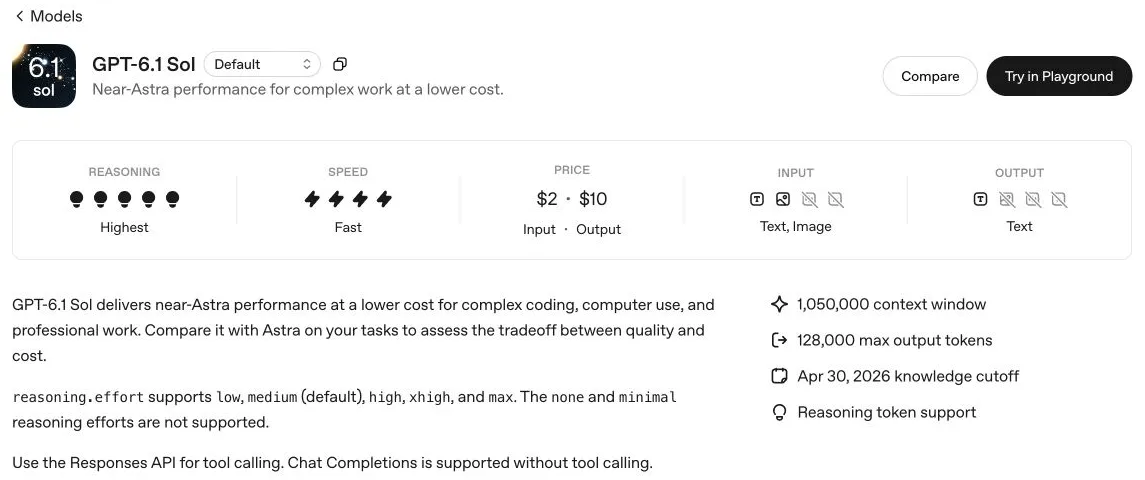
Actual English-language OpenAI documentation screenshot, captured September 30, 2026. This is specification evidence, not a screenshot of an inference test. Source: the model specification linked above.
The practical consequence depends on your starting point. If you already use Responses with medium, a controlled model substitution is a reasonable first experiment. If you use Chat Completions with function definitions and none, changing the model alone leaves two incompatibilities: an unsupported effort and the wrong endpoint for tools. Treat that as an integration migration before assessing answer quality.
There is also a useful boundary for creative workflows. Text and image input with text output can support tasks such as reviewing a storyboard or checking copy in a supplied image. It does not mean the model natively returns a finished video. The documented image-generation tool is a separate tool capability. Confirm the actual execution path and its billing before promising an end-to-end creative deliverable.
How much does GPT-6.1 Sol cost?
Use the official API pricing table for the service mode you select. At publication, Standard short-context prices per million tokens are $2 ordinary input, $0.10 cache reads, $2.50 cache writes, and $10 output. These are OpenAI list prices, not Ofox quotes or ChatGPT subscription charges.
The rate table alone cannot tell you the cost of a completed task. A longer answer, more reasoning, an extra tool round, or a retry can outweigh the cache discount. Keep billable token categories separate: do not count the same cached token again as ordinary input, and do not count reasoning output twice when it is already included in total output usage. See the reasoning-token documentation.
For a request whose billable categories have already been separated:
Standard short-context USD =
  (ordinary_input × 2
   + cache_read × 0.10
   + cache_write × 2.50
   + total_billable_output × 10) / 1,000,000
Three examples you can reproduce
These are hypothetical calculations with identical token counts across models, not observed invoices or predictions of model behavior. They exclude tool charges, taxes, regional premiums, and retries.
| Example | GPT-6.1 Sol | GPT-6 Sol | Interpretation |
|---|---|---|---|
| 20,000 ordinary input + 5,000 output; no cache | $0.090 | $0.090 | No savings from the base token rates |
| 10,000 ordinary input + 100,000 cache reads + 5,000 output | $0.080 | $0.090 | $0.010 saved per identical request, about 11.1% of this example’s total |
| 300,000 ordinary input + 10,000 output; no cache | $1.350 | $1.350 | Long-context rates apply to the full request |
For the second row: 0.01 × $2 + 0.10 × $0.10 + 0.005 × $10 = $0.08. The cache-read unit rate falls 50%; the whole request falls only 11.1% under these assumptions. At 10,000 such requests, the arithmetic is $800 versus $900, before any other costs. A single change in output length could alter that comparison.
The third row crosses the documented 272,000-input-token threshold. For prompts above it, Standard input and cache rates double and output becomes 1.5 times its short-context rate, for the full request. Thus 0.30 × $4 + 0.01 × $15 = $1.35. Do not apply the higher rate only to the 28,000 tokens above the threshold.
Fast is priced at twice Standard; Batch and Flex are listed at half Standard, with their own availability and execution characteristics. Select the applicable table before calculating rather than stacking discounts. For cached workloads, separately account for eligible cache writes; repeated text is not evidence of a cache hit. Our guide to task cost and caching explains the measurement approach for the previous Sol generation; use the new rates above for 6.1.
Migrate a small workflow before changing production
The goal of the first pass is to separate request compatibility from useful task completion. Start with a disposable development fixture, not a customer transaction. Keep the old route available so a failed experiment does not force a hurried production rollback.
1. Record the working baseline
Save the old model ID, endpoint, SDK version, effective reasoning effort, system instructions, tool schemas, and a sanitized input fixture. Record whether the workflow uses streaming and how it identifies final output. If another layer inserts parameters, inspect the final request payload as well as your application code.
Preserve a supported effort for the first comparison. For none or minimal, OpenAI recommends starting at low and evaluating again. That change may affect latency or token usage; it is not an equivalent no-reasoning mode. For this model, remove incompatible sampling fields such as temperature, top_p, and top_logprobs. Chat Completions also requires removal of logprobs; Responses should not request message.output_text.logprobs. These changes follow the official migration guide linked above.
2. Send a minimal text request
Requirements: a current OpenAI Python SDK, a development environment, an OpenAI API project with billing and model access, and OPENAI_API_KEY in the environment. Install with python -m pip install --upgrade openai. Do not paste keys into the script or a shared terminal transcript.
import os
from openai import OpenAI

client = OpenAI(
    api_key=os.environ["OPENAI_API_KEY"],
    base_url="https://api.openai.com/v1",
)
response = client.responses.create(
    model="gpt-6.1-sol",
    reasoning={"effort": "low"},
    input="Return only the result of 17 + 25.",
    max_output_tokens=4096,
)
print("model:", response.model)
print("status:", response.status)
print("answer:", response.output_text)
print("usage:", response.usage)
Expected semantic answer: 42. Check that the response completed, returned the requested model, and has nonempty text. The exact whitespace is not the test. If the response is incomplete, inspect its reason and output budget instead of recording it as a successful migration. The chosen output cap is an example, not an optimal budget for every task.
Validation scope: the examples in this article were checked locally for syntax and fixture logic. No live GPT-6.1 Sol completion was purchased for this guide; the expected result is a test assertion you should verify, not a claimed run result.
3. Verify one complete read-only tool round trip
A model returning a function call has not executed your function. Your application must validate arguments, execute the permitted operation, and send its result back with the matching call ID. For reasoning models, preserve the response output items needed for continuation. The official function-calling guide documents this exchange.
Append this to the client setup above. The inventory is deliberately fictional and never contacts a store:
import json

inventory = {"DEMO-001": 7}
tools = [{
    "type": "function",
    "name": "lookup_stock",
    "description": "Read stock from the local demonstration fixture.",
    "strict": True,
    "parameters": {
        "type": "object",
        "properties": {"sku": {"type": "string"}},
        "required": ["sku"],
        "additionalProperties": False,
    },
}]
items = [{"role": "user", "content":
          "Use lookup_stock for DEMO-001 and report the available units."}]
completed = False
for _ in range(4):  # Example safety bound, not an API limit.
    result = client.responses.create(
        model="gpt-6.1-sol",
        reasoning={"effort": "low"},
        input=items,
        tools=tools,
        max_output_tokens=4096,
    )
    if result.status != "completed":
        raise RuntimeError(f"Incomplete response: {result.status}")
    items.extend(result.output)
    calls = [x for x in result.output if x.type == "function_call"]
    if not calls:
        if not result.output_text:
            raise RuntimeError("No final text returned")
        print(result.output_text)
        completed = True
        break
    for call in calls:
        args = json.loads(call.arguments)
        if (call.name != "lookup_stock" or not isinstance(args, dict)
                or set(args) != {"sku"} or not isinstance(args["sku"], str)):
            raise ValueError("Unexpected tool or arguments")
        sku = args["sku"]
        payload = {"sku": sku, "units": inventory.get(sku)}
        items.append({"type": "function_call_output",
                      "call_id": call.call_id,
                      "output": json.dumps(payload)})
if not completed:
    raise RuntimeError("Tool loop exceeded the demonstration round limit")
Check the transcript for a lookup_stock call with DEMO-001, the matching result containing seven units, and a final answer consistent with that result. A final answer without the requested tool call fails this particular test, even if it guesses seven. An unknown SKU returns null; your production prompt and application should treat that as unknown, never as zero inventory.
This small script intentionally raises on malformed arguments or incomplete output. A production integration needs explicit error handling, logging without secrets, cancellation, and retry rules. For tools that change external state, prevent duplicate execution on retries and enforce permissions in the application. A model instruction alone is not an authorization boundary. For a broader walkthrough, see our Responses migration guide.
4. Check streaming and user-visible completion
Run the same fixture through your real transport after the nonstreaming case works. Check that text fragments assemble once, tool arguments finish before execution, cancellation stops new work, and your UI distinguishes a completed answer from an interrupted response. A spinner disappearing is not adequate evidence that an action succeeded.
Keep a trace ID for each attempt and associate its model, effort, token usage, elapsed time, and outcome. Record failures too. Otherwise an apparently cheaper successful call can hide several discarded attempts. Compare end-to-end task time, including tools and validation, rather than only time to first token.
How to decide whether to switch
Use a small set of work your team can grade independently. The following is a proposed evaluation worksheet, not our benchmark results. Start with at least several examples in each important category, including known failures; expand the sample before generalizing to production.
| Workload | Input fixture | What a pass requires | Failure that matters |
|---|---|---|---|
| Code maintenance | Small repository, reproducible failing test, bounded change request | Correct patch, relevant test passes, no unrelated behavior changes | Superficial fix that breaks another case |
| Report writing | Notes with dates, a conflicting figure, and an unknown owner | Traceable numbers, conflict identified, unknown left unresolved | Plausible invented number or assignment |
| Tool workflow | Known and unknown inventory SKUs | Correct calls, IDs, data use, and unknown handling | Guessing without the tool or repeated side effects |
| Image understanding | Sanitized screenshot with a specific visual question | Correct reading of the relevant element and uncertainty where illegible | Fluent answer unsupported by pixels |
For each fixture, compare the old and new models with the same inputs, tool environment, and evaluation rules. Hide model names from the reviewer when practical. Run multiple repetitions for cases where outcomes vary. If you also change the prompt, SDK, or effort, label that as a separate experiment so you know which change helped.
A useful report has four numbers: accepted tasks out of attempted tasks, total API spend including failed attempts, elapsed time for the whole task, and manual correction time. Define “accepted” before running the comparison. For example, a report with a fabricated revenue figure fails even if its formatting is excellent; a patch with an unrelated deletion fails even if the target test passes.
Use cost per accepted task = total measured spend / accepted tasks. If no tasks pass, report no accepted tasks rather than dividing by zero or calling the run cheap. Keep human review time separate unless you explicitly state an hourly-cost assumption. This makes the business tradeoff visible without pretending token rates measure finished-work quality.
For rollout, choose your own error and latency thresholds from the current service baseline. A reasonable sequence is internal testing, then a limited share of eligible low-risk work, followed by expansion only after reviewing results. Keep the previous model configuration ready. Revert the affected route if it violates your acceptance criteria; retain traces so you can distinguish model behavior from adapter defects. Our Sol, Luna, and Astra task-selection guide provides background for evaluating more than one tier.
If the first request fails
| Symptom | First thing to inspect | Next action |
|---|---|---|
Unsupported reasoning_effort | An old none or minimal setting | Use low, then rerun the same fixture |
| Tools rejected | Request sent to Chat Completions | Move the complete tool loop to Responses |
| Sampling parameter error | Fields inserted by your SDK wrapper | Remove incompatible fields from the final payload |
| Model not found or access denied | Exact ID, API base URL, account access | Confirm the provider’s actual catalog and credentials |
| Empty or incomplete answer | Status, output budget, tool-call items | Inspect the response before retrying; execute required tools correctly |
| Higher bill despite lower cache rate | Cache hits, output usage, context threshold, mode, retries | Recompute using actual billed categories |
Avoid changing all these settings at once. Preserve the failing payload without credentials, alter one relevant field, and rerun the same test. That produces evidence you can use when reporting a provider or integration issue.
A practical next step
Start with one existing GPT-6 Sol workflow whose output you can judge. Confirm access, preserve its supported reasoning setting, and resolve the endpoint changes before comparing quality. Then calculate cost from measured usage and accepted results. GPT-6.1 Sol’s launch makes that experiment worthwhile; it does not replace the experiment.
If you use Ofox, first verify that the exact new model and required protocol appear in the current model catalog. Until then, keep the documented OpenAI example and your Ofox production configuration separate. This page’s access and pricing facts were checked on September 30, 2026; recheck the linked official tables when adopting the model later.
Frequently Asked Questions
- Does GPT-6.1 Sol support reasoning effort none?
- No. Use low, medium, high, xhigh, or max. If your GPT-6 Sol application used none, start with low and reevaluate latency, cost, and quality.
- Can GPT-6.1 Sol call tools through Chat Completions?
- No. Its tool calling requires the Responses API. Chat Completions is supported for requests without tools.
- Is GPT-6.1 Sol cheaper than GPT-6 Sol?
- Their published Standard short-context input and output rates are the same. GPT-6.1 Sol has a lower cached-input rate. Actual task cost also depends on token usage, retries, tools, context length, and service mode.