Seedance 2.5 vs 2.0: What Changed, and When 2.0 Still Wins
Seedance 2.5 doubles clips to 30s and takes 50 references, but caps at 720p until 2026-08-17 and costs 60% more per second.
 Ofox
Ofox 
Seedance 2.5 is a longer, richer, more controllable model than Seedance 2.0, and it is also capped at 720p until 2026-08-17 and 60% more expensive per second. Anyone describing it as a straight upgrade has not read the vendor’s own capabilities table, where the resolution row goes backwards. ByteDance has now dated the half of that gap it intends to close, and 4K is not in it.
Length:      30s on 2.5, 15s on 2.0
References:  50 assets on 2.5 (30 img + 10 vid + 10 audio), 15 on 2.0 (9 + 3 + 3)
Timestamps:  integer seconds on 2.5, shot numbers only on 2.0
Resolution:  480p and 720p on 2.5 (1080p from 2026-08-17); 480p to 4K on 2.0
Price:       $0.11 and $0.24 per second on 2.5; $0.063 and $0.15 on 2.0
Formats:     mp4 and mov on 2.5, mp4 on 2.0
Measured:    identical 6s clip billed $0.66 on 2.5, $0.378 on 2.0
Snapshot:    2026-08-14
Everything here is either from ByteDance’s Seedance 2.5 tutorial and prompt guide, or from generations we ran on both models through one endpoint on 2026-08-13.
What Actually Changed?
The capabilities table ByteDance publishes is the honest version, and it has a row nobody quotes.
| Seedance 2.5 | Seedance 2.0 | |
|---|---|---|
| Model ID at source | dreamina-seedance-2-5-260628 | dreamina-seedance-2-0-260128 |
| Output duration | 4 to 30 s | 4 to 15 s |
| Output resolution | 480p, 720p (1080p from 2026-08-17) | 480p, 720p, 1080p, 4K |
| Reference assets | 50 (30 images + 10 videos + 10 audio) | 15 (9 images + 3 videos + 3 audio) |
| Audio-only reference | Yes | No, requires an image or video |
| Output format | mp4, mov | mp4 |
| Timestamps in prompt | Integer seconds | Shot numbers only |
| Multi-view subject images | Supported | Not recommended |
The reference budget is the headline the launch coverage picked up, and the 50 is real: 30 images at up to 4K, 10 videos totalling 30 seconds, 10 audio clips totalling 30 seconds. The guide’s recommended working range is far below the ceiling, at 1 to 8 image subjects and 1 to 5 audio or video subjects, past which it warns stability drops.
The row that decides real projects is resolution, and it is the one row with a moving part. As of 2026-08-14 Seedance 2.5 does not do 1080p and does not do 4K; the capabilities table above, last updated 2026-08-13, still says so, and the API enforces it. Three days from now half of that changes: the ModelArk pricing page states that Seedance 2.5 “will officially support 1080p output starting from August 17, 2026, Beijing time”, and already lists the 1080p token rate it will bill at. There is no equivalent notice for 4K. So if your deliverable is a 4K master, this comparison ends here and the answer is Seedance 2.0. If it is 1080p, the answer is Seedance 2.0 this week and an open question next week, at a price we break down below.
Does Seedance 2.5 Really Follow Timestamps?
Both models hit the beats. Only 2.5 hits them on the second and performs the whole instruction.
This is the change with the most daylight between the documentation and reality, so we tested it rather than quoting it. One prompt, three beats, explicit second ranges, sent to both models at 480p within the same second:
0-2s: the paper fox sits still, then its ears twitch twice.
2-4s: the fox unfolds into a single flat sheet of orange paper.
4-6s: the flat sheet folds itself back into the fox, which hops once
      toward the camera and freezes.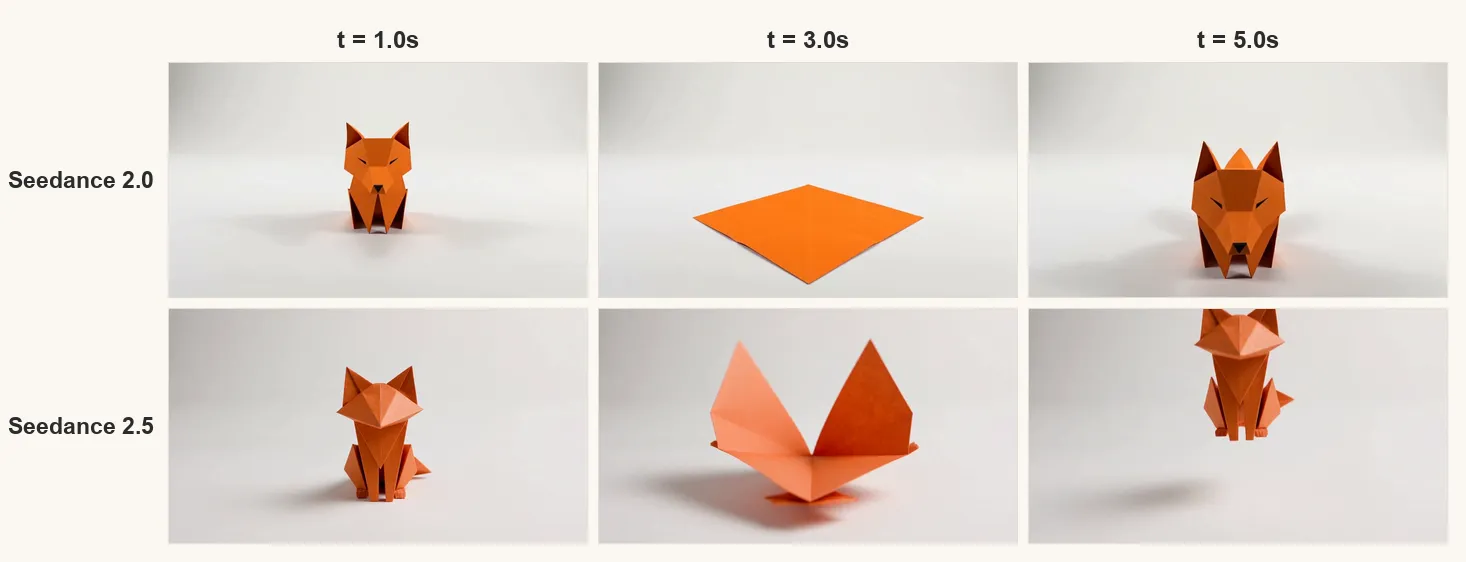
Sampling both clips at t=1s, t=3s and t=5s: at one second both show the intact fox, which is beat one. At three seconds, in the middle of the unfold beat, Seedance 2.0 has already finished unfolding to a flat sheet while Seedance 2.5 is mid-fold, which is what the script asks for at that instant. At five seconds Seedance 2.5 is airborne in the hop; Seedance 2.0 has refolded but skips the hop and ends on the fox scaled up toward the camera instead.
So the vendor’s line that “Seedance 2.0 does not respond to timestamps and only responds to shot numbers” is directionally right rather than literally right. On a simple three-beat script with evenly spaced beats, 2.0 does land roughly the right content in roughly the right window. What 2.5 adds is precision within the beat, and it executed the compound instruction at the end where 2.0 dropped half of it.
That matches the earlier guidance rather than contradicting it. The Seedance 2.0 prompt guide asks you not to pin exact timings, warning that support for instructions like “0–3 seconds” is unstable and “may lead to abnormal generation results”. Our clip was not abnormal, it was approximate. For a six-second clip, approximate is fine. For a 30-second clip with ten beats, approximate compounds, which is exactly the workload 2.5 exists for.
One caveat we hit ourselves: giving 2.5 a three-beat script and a 30-second budget produces a coherent clip that spends about ten seconds on a flat sheet of paper. Timestamps do not manufacture plot. The guide’s rule of thumb, roughly one beat every two to three seconds, is the one to design against. Our full prompt walkthrough is in how to use Seedance 2.5.
How Much More Does Seedance 2.5 Cost?
About 75% more per second at 480p, 60% more at 720p, and there is no tier of 2.5 that undercuts 2.0.
| Route | Seedance 2.5 | Seedance 2.0 | Difference |
|---|---|---|---|
| 480p, text or image to video | $0.11/s | $0.063/s | +75% |
| 480p, with video input | $0.14/s | $0.081/s | +73% |
| 720p, text or image to video | $0.24/s | $0.15/s | +60% |
| 720p, with video input | $0.30/s | $0.18/s | +67% |
| 1080p | not until 2026-08-17 | $0.31/s | n/a |
| 4K | not available | $1.24/s | n/a |
Read those figures as what you pay today rather than as list prices. The Seedance 2.0 rates above carry a 10% discount on ofox at the time of writing, marked on the model page against a $0.07 and $0.16 list; Seedance 2.5 carries none. List against list the gap narrows to about 57% at 480p and 50% at 720p, so part of today’s spread is a promotion that can end.
What that costs on a real clip, from our own invoices on 2026-08-13:
| Clip | Seedance 2.5 | Seedance 2.0 |
|---|---|---|
| 6 seconds, 480p | $0.66 | $0.378 |
| 30 seconds, 480p | $3.30 | not possible |
ByteDance’s own pricing tells the same story in a different unit: dreamina-seedance-2-5-260628 is $10.70 per million tokens without video input, against $7.00 for dreamina-seedance-2-0-260128 at 480p and 720p. Tokens scale with pixels and duration, so the per-second gap and the per-token gap land in the same place.
Three things skew comparisons if you are pricing this out. ByteDance has a discount running from 2026-08-07 to 2026-09-07 that takes Mini to 40% of list and Fast to 75%; it does not cover the base 2.0 model, which stays at $7.00. There is now a Seedance 2.5 discount too, opened 2026-08-14 and running to 2026-09-17, but it applies to 1080p output only and the same sentence excludes 480p and 720p, so it changes nothing you can generate before the 17th. The $10.70 against $7.00 comparison above is unaffected by either. And 4K on 2.0 has a lower per-token rate than 480p, because the token count explodes with pixel area; the per-second rate is what you should compare, not the token rate.
What the 1080p tier will cost is already on the pricing page: $11.70 per million tokens without video input and $7.00 with it, billed at 72% of that during the discount window, which ByteDance estimates as “approximately USD 0.41 per second”. Seedance 2.0 bills 1080p at $7.70 per million tokens at the same source, which is about $0.37 per second for a 1920×1080 clip at 24 fps by the vendor’s own formula. So during the discount window the two land within about 9% of each other at 1080p, and once it closes on 2026-09-17 the 2.5 rate is roughly 52% higher. That is the narrowest the price gap between these two families gets, and it lasts a month. Gateway rates are what you will actually pay, so check the model page when 1080p appears rather than assuming the source ratio carries over.
The cheap tiers stay a 2.0 story. bytedance/seedance-2.0-fast and bytedance/seedance-2.0-mini have no 2.5 equivalent, so the floor for a throwaway test clip is still on the older family. We broke those down in the Seedance 2.0 tier comparison.
Which One Is Faster?
Seedance 2.5, in the only test we ran, by 2.8x.
| Model | Same 6s 480p prompt | Wall clock |
|---|---|---|
| Seedance 2.5 | submitted first second | 103 s |
| Seedance 2.0 | submitted next second | 289 s |
Both requests went out one second apart, so queue conditions were comparable. This is one pair of runs on shared infrastructure and not a latency benchmark; what it does rule out is the assumption that the longer-context model must be the slower one. Our 30-second clip on 2.5 took 200 seconds, which is less than the 2.0 six-second clip took on the same afternoon.
If your pipeline has a timeout, size it for minutes on either model, and use a callback_url rather than a polling loop with a short ceiling.
Which One Should You Use?
Pick by deliverable, not by version number.
| If you need | Use | Why |
|---|---|---|
| 4K output, or 1080p before 2026-08-17 | Seedance 2.0 | 2.5 stops at 720p until then and refuses higher with a 400 |
| A single clip longer than 15 seconds | Seedance 2.5 | 2.0 rejects duration above 15 |
| Cheap iteration while you find the prompt | Seedance 2.0 Mini or Fast | No 2.5 tier goes below $0.11/s |
| Precise beat timing inside the clip | Seedance 2.5 | Integer-second timestamps |
| More than 15 reference assets, or audio-only reference | Seedance 2.5 | 2.0 caps at 15 and requires an image or video |
| Editing or extending existing footage with matched colour | Seedance 2.5 | mov output, plus documented edit and extend controls |
| The lowest cost per finished second, any resolution | Seedance 2.0 | 40% cheaper at 720p, and cheaper still on Fast and Mini |
The workflow that gets the best of both: iterate on 2.0 Mini at 480p until the script and the references are settled, then run the final at whatever the deliverable demands, which is 2.5 if it is long or 2.0 if it is high resolution. Because both sit behind one endpoint, that is a model-string change rather than an integration.
How Do You Switch Between Them?
One string, and two fields that will bite. On a gateway both models are on the same /v1/videos request shape, so bytedance/seedance-2.0 becomes bytedance/seedance-2.5 and nothing else moves. The two failure modes are symmetric and both arrive as a synchronous HTTP 400 before anything is billed:
{"error":{"code":"unsupported_parameter",
"message":"duration 30 out of range [4, 15]"}}{"error":{"code":"unsupported_parameter",
"message":"resolution \"1080p\" not supported; allowed: [480p 720p]"}}The first is 2.0 refusing a 2.5-length request. The second is 2.5 refusing a 2.0-resolution request, which is the one with a shelf life: once 1080p turns on for 2.5 on 2026-08-17, that string stops being an error and starts being a bill at a higher tier. Neither degrades quietly, which means a bad switch shows up in your error log rather than in your invoice.
The subtler migration cost is in the prompt, not the parameters. Seedance 2.5 sorts requests into locked and unlocked tasks, and locked tasks (editing, extension, first and last frame) force ratio to adaptive and, for editing, duration to -1. Editing and extension also require trigger words in the prompt itself, so a 2.0-era edit instruction with no trigger gets reclassified as a reference job and comes back as a new video. The Seedance 2.5 guide has the trigger list and the locked-task table; the Seedance 2.0 guide still applies to everything 2.5 did not change, including the six documented failure modes and their fixes.
For all four models in one table, with prices and the failure modes, see the Seedance API guide.
References
Frequently Asked Questions
- Is Seedance 2.5 better than Seedance 2.0?
- For length, references, and timeline control, yes. For resolution and price, no. Seedance 2.5 generates up to 30 seconds against 15, accepts 50 reference assets against 15, and follows integer-second timestamps that 2.0 ignores. Seedance 2.0 is the only one of the two that outputs 4K, and the only route to 1080p until ByteDance turns 1080p on for 2.5 on 2026-08-17, and it costs about 40% less per second at the same resolution. Neither replaces the other.
- Does Seedance 2.5 support 4K or 1080p?
- No 4K, and 1080p arrives on 2026-08-17. ByteDance's capabilities table, last updated 2026-08-13, lists 480p and 720p for Seedance 2.5 against 480p, 720p, 1080p and 4K for Seedance 2.0, and the ModelArk pricing page separately says 2.5 starts supporting 1080p on 2026-08-17 Beijing time at its own token rate. Until then, requesting 1080p from 2.5 through a gateway returns HTTP 400 with 'resolution 1080p not supported; allowed: [480p 720p]' rather than silently downscaling. Nothing has been announced about 4K on 2.5.
- How much more expensive is Seedance 2.5?
- About 75% more at 480p and 60% more at 720p. On ofox, 2.5 is $0.11 and $0.24 per second against $0.063 and $0.15 for 2.0. We generated the same 6-second clip on both on 2026-08-13: 2.0 billed $0.378 and 2.5 billed $0.66. On ByteDance's own token pricing the gap is similar, $10.70 per million tokens against $7.00 at the same resolutions.
- Which model is faster?
- In our test, 2.5. The same 6-second 480p prompt submitted to both within the same second took 103 seconds on Seedance 2.5 and 289 seconds on Seedance 2.0, a 2.8x difference. That is a single pair of runs on shared infrastructure, not a benchmark, so treat it as a hint that the newer model is not slower rather than a published latency figure.
- Do Seedance 2.0 prompts work on 2.5?
- They run, but they leave capability on the table and can misfire. Timestamps that 2.0 was documented to handle badly are now first-class. Edit and extend tasks on 2.5 require trigger words in the prompt and lock ratio and duration, so a 2.0-era edit prompt can be reclassified as a reference job and return a new video instead of an edited one. Rewrite the plot section before you switch, not after.
- Can I switch between Seedance 2.0 and 2.5 without changing my code?
- Through a gateway it is one string, since both sit on the same video endpoint. Two request fields need attention: duration above 15 is rejected by 2.0, and resolution above 720p is rejected by 2.5 until 1080p lands on 2026-08-17. Both fail at submit time with an HTTP 400 rather than degrading, so a switch that violates either shows up immediately in your logs.