OpenClaw API Setup & Model Configuration Guide (2026)
Configure OpenClaw with any AI provider — OpenAI, Anthropic, Google, Ofox, Ollama. Covers config.yaml, multi-model routing, cost optimisation, error fixes.
 Ofox
Ofox 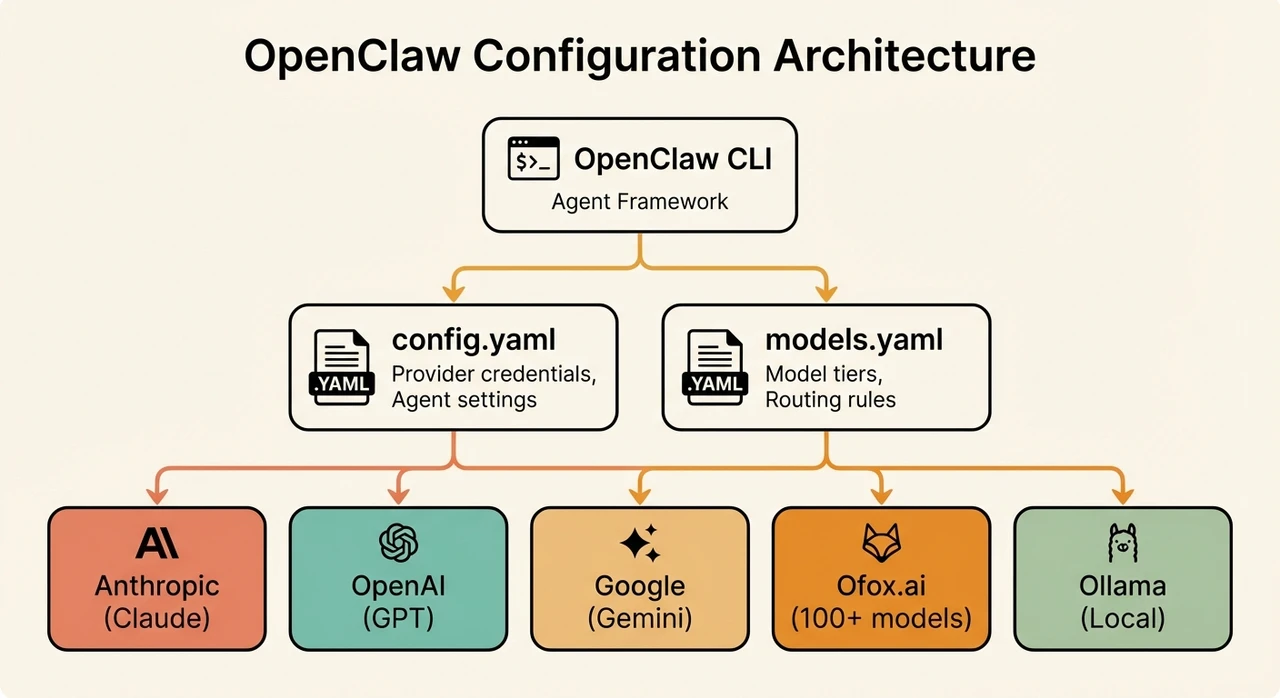
TL;DR
OpenClaw is an open-source AI agent framework that runs in your terminal. This guide walks you through every aspect of configuring it: from the initial openclaw onboard setup to advanced multi-model routing with fallback chains. You will learn how to connect OpenClaw to any API provider — direct (OpenAI, Anthropic, Google), aggregation platforms (Ofox, OpenRouter, Together AI), or local (Ollama) — and optimize your configuration for cost, speed, and reliability.
What Is OpenClaw and Why API Configuration Matters
OpenClaw is an open-source command-line AI agent designed for software developers. Think of it as an AI pair programmer that lives in your terminal — it can read your codebase, write and edit files, run commands, and reason about complex engineering problems. It launched in early 2026 and has quickly gained traction among developers who want the power of AI coding assistants without vendor lock-in.
Unlike hosted AI coding tools that bundle their own models, OpenClaw is a framework. It provides the agent logic — tool use, context management, multi-step reasoning, code editing — but relies on external LLM APIs for the underlying intelligence. This architecture means that your choice of API provider and model directly determines OpenClaw’s capability, speed, and cost.
A poorly configured OpenClaw setup leads to slow responses, unnecessary expense, or outright failures when your provider has issues. A well-configured setup gives you fast, reliable AI assistance that automatically adapts to provider outages, uses cheap models for simple tasks, and reserves expensive models for complex reasoning.
This guide covers everything you need to get OpenClaw’s API configuration right.
Quick Start: The openclaw onboard Walkthrough
If you are installing OpenClaw for the first time, the onboarding wizard handles the basic setup:
# Install OpenClaw
npm install -g @openclaw/cli

# Run the onboarding wizard
openclaw onboard
The wizard walks you through four steps:
Step 1: Choose a provider. You will see a list of supported providers. The simplest path is to choose your primary provider here (OpenAI or Anthropic are the most common starting points).
? Select your AI provider:
  ❯ Anthropic (Claude)
    OpenAI (GPT)
    Google (Gemini)
    Custom OpenAI-compatible endpoint
    Local model (Ollama)
Step 2: Enter your API key. Paste your API key. OpenClaw validates it immediately by making a test request.
? Enter your Anthropic API key: sk-ant-••••••••••••••••
✓ API key validated successfully
Step 3: Select your default model. OpenClaw suggests a default model based on your provider. You can change this later.
? Select your default model:
  ❯ claude-sonnet-4.6 (recommended — best quality/cost balance)
    claude-opus-4.6 (highest quality, higher cost)
    claude-haiku-3-5 (fastest, lowest cost)
Step 4: Configuration saved. OpenClaw writes your configuration to ~/.openclaw/config.yaml.
✓ Configuration saved to ~/.openclaw/config.yaml
✓ OpenClaw is ready! Run 'openclaw' in any project directory to start.
This gets you a working setup, but there is much more to configure for a production-grade experience.
Configuration File Structure
OpenClaw uses two main configuration files, both in YAML format:
~/.openclaw/
├── config.yaml      # Global settings, default provider, preferences
├── models.yaml      # Model definitions, fallback chains, routing rules
├── search.yaml      # Search provider configuration
└── usage/           # Local usage tracking data
    └── 2026-03.json
Project-level overrides can be placed in .openclaw/config.yaml within any project directory. Project configs are merged on top of the global config.
config.yaml: Global Settings
# ~/.openclaw/config.yaml

# Default provider and model
provider: anthropic
model: claude-sonnet-4.6

# API credentials (can also use environment variables)
providers:
  anthropic:
    api_key: sk-ant-your-key-here
    base_url: https://api.anthropic.com/v1

  openai:
    api_key: sk-your-openai-key-here
    base_url: https://api.openai.com/v1

# Agent behavior
agent:
  # Maximum tokens per response
  max_tokens: 4096

  # Temperature for generation (0.0 = deterministic, 1.0 = creative)
  temperature: 0.3

  # Maximum context window usage (percentage)
  max_context_usage: 0.8

  # Auto-approve file edits without confirmation
  auto_approve: false

  # Number of retries on API failure
  max_retries: 3

# Output preferences
output:
  # Show token usage after each response
  show_usage: true

  # Show cost estimate after each response
  show_cost: true

  # Theme: dark, light, or auto
  theme: auto

# Logging
logging:
  level: info  # debug, info, warn, error
  file: ~/.openclaw/logs/openclaw.log
models.yaml: Model Definitions and Routing
This file defines which models are available and how OpenClaw selects between them:
# ~/.openclaw/models.yaml

# Model tiers — OpenClaw selects the appropriate tier based on task complexity
tiers:
  # Primary: used for most tasks (code generation, complex reasoning)
  primary:
    provider: anthropic
    model: claude-sonnet-4.6
    max_tokens: 8192
    temperature: 0.3

  # Fallback: used when primary is unavailable
  fallback:
    provider: openai
    model: gpt-4o
    max_tokens: 4096
    temperature: 0.3

  # Economy: used for simple tasks (file summaries, quick lookups)
  economy:
    provider: anthropic
    model: claude-haiku-3-5
    max_tokens: 2048
    temperature: 0.2

# Task-to-tier routing
routing:
  # Tasks that should use the primary model
  primary_tasks:
    - code_generation
    - architecture_review
    - bug_analysis
    - complex_refactor

  # Tasks that can use the economy model
  economy_tasks:
    - file_summary
    - simple_question
    - format_check
    - git_message

  # Fallback is automatic — used when the active tier's provider fails
API Provider Options: Choosing the Right Setup
OpenClaw supports any endpoint that implements the OpenAI chat completions API format. This gives you a wide range of options.
Direct Provider APIs
The most straightforward approach is connecting directly to model providers.
Anthropic (Claude)
providers:
  anthropic:
    api_key: sk-ant-your-key-here
    base_url: https://api.anthropic.com/v1
Anthropic’s Claude models are among the strongest for coding tasks. Claude Sonnet 4.6 is the most popular choice for OpenClaw users due to its excellent balance of quality and speed. Claude Opus 4.6 is available for tasks that need deeper reasoning, though at 5-8x the cost.
Pros: Best-in-class coding performance, large 200K context window, excellent instruction following. Cons: Occasional 529 overloaded errors during peak hours, higher price than some alternatives.
OpenAI (GPT)
providers:
  openai:
    api_key: sk-your-key-here
    base_url: https://api.openai.com/v1
OpenAI’s GPT-4o and GPT-5.4 are strong general-purpose models. GPT-4o-mini is an excellent economy choice.
Pros: Mature API, excellent tooling ecosystem, fast inference. Cons: Rate limits can be restrictive on lower usage tiers, pricing has increased for frontier models.
Google (Gemini)
providers:
  google:
    api_key: your-google-api-key
    base_url: https://generativelanguage.googleapis.com/v1beta/openai
Google now offers an OpenAI-compatible endpoint for Gemini models. Gemini 3 Pro has a massive 2M token context window, which is useful for working with very large codebases.
Pros: Huge context window, competitive pricing, good multimodal support. Cons: Slightly less consistent on code generation compared to Claude/GPT, safety filters can be aggressive.
Aggregation Platforms
Aggregation platforms provide a single API endpoint that routes to multiple model providers. This simplifies key management and lets you switch models easily.
Ofox.ai
providers:
  ofox:
    api_key: ofox-your-key-here
    base_url: https://api.ofox.run/v1
Ofox.ai provides access to 100+ models through a single OpenAI-compatible endpoint and API key. You configure different models in your tiers and all requests go through the same base URL. This is particularly convenient for OpenClaw’s multi-model routing — your primary, fallback, and economy models can all use the same provider config with different model names.
# Example: all tiers through Ofox
tiers:
  primary:
    provider: ofox
    model: anthropic/claude-sonnet-4.6
    max_tokens: 8192
  fallback:
    provider: ofox
    model: openai/gpt-4o
    max_tokens: 4096
  economy:
    provider: ofox
    model: anthropic/claude-haiku-3-5
    max_tokens: 2048
Pros: Single key for all models, unified billing, easy model switching. Cons: Additional network hop adds slight latency, depends on aggregator availability.
OpenRouter
providers:
  openrouter:
    api_key: sk-or-your-key-here
    base_url: https://openrouter.ai/api/v1
OpenRouter is another popular aggregation platform with a large model catalog. It provides model pricing transparency and usage analytics.
Pros: Large model selection, community-driven, transparent pricing. Cons: Variable latency depending on model routing.
Together AI
providers:
  together:
    api_key: your-together-key
    base_url: https://api.together.xyz/v1
Together AI focuses on open-source models with fast inference. Good for running open models like Llama, Mixtral, and DeepSeek at competitive prices.
Pros: Fast inference for open models, competitive pricing. Cons: Limited proprietary model access.
Local Models with Ollama
For complete privacy and zero API costs, run models locally with Ollama:
# Install Ollama
curl -fsSL https://ollama.ai/install.sh | sh

# Pull models
ollama pull deepseek-coder-v2
ollama pull llama3.3:70b
ollama pull qwen2.5-coder:32bproviders:
ollama:
api_key: ollama # Ollama doesn't require a real key
base_url: http://localhost:11434/v1Local models are excellent as economy tier models or for offline work:
tiers:
  primary:
    provider: anthropic
    model: claude-sonnet-4.6

  fallback:
    provider: openai
    model: gpt-4o

  # Free, private, works offline
  economy:
    provider: ollama
    model: deepseek-coder-v2
    max_tokens: 4096
Recommended local models for OpenClaw in 2026:
| Model | VRAM Required | Best For |
|---|---|---|
| DeepSeek Coder V2 (16B) | 12 GB | Code generation, code review |
| Qwen 2.5 Coder (32B) | 24 GB | Complex coding tasks |
| Llama 3.3 (70B) | 48 GB | General-purpose, reasoning |
| Codestral (22B) | 16 GB | Code completion, editing |
Model Configuration Deep Dive
Getting your model tiers right is the most impactful configuration decision. The wrong setup either wastes money or delivers poor results.
Understanding Model Tiers
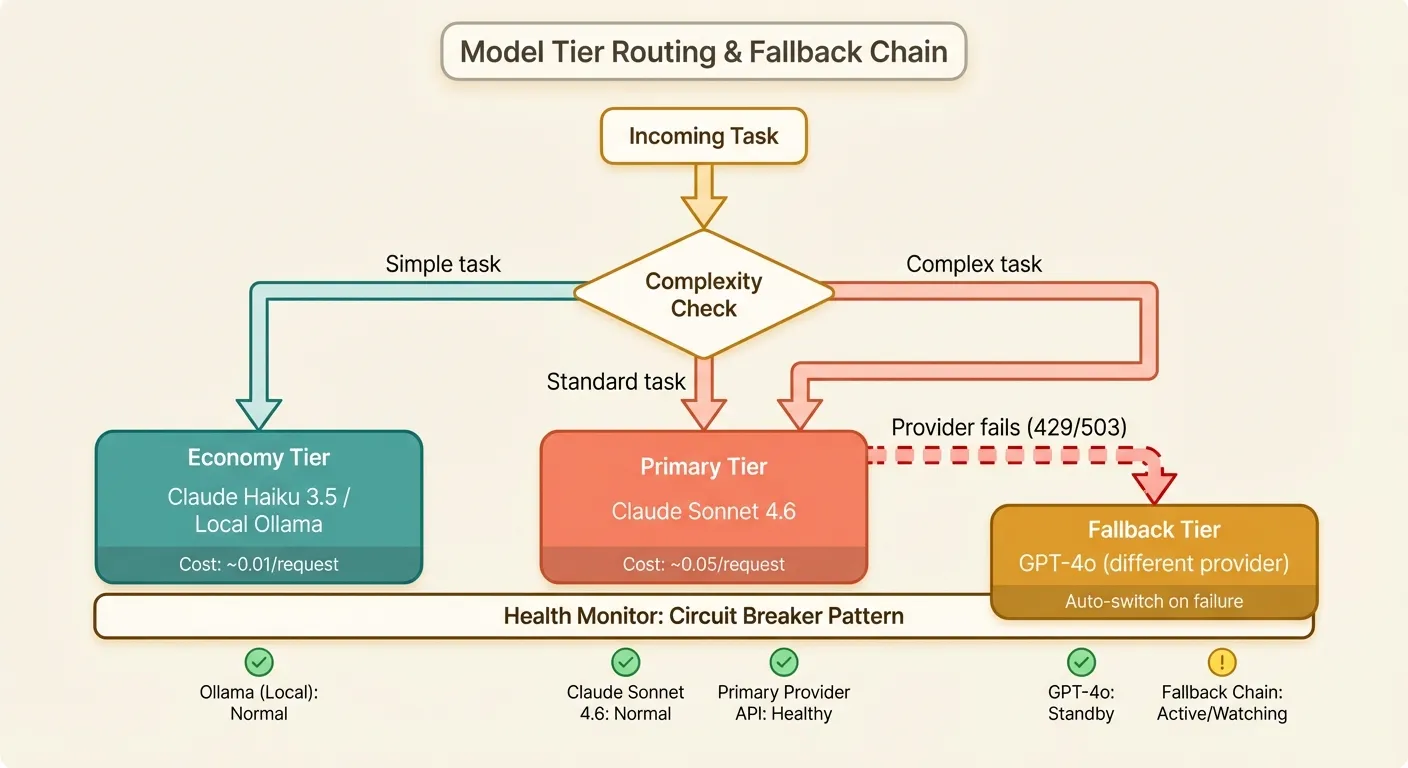
OpenClaw uses three tiers, each serving a different purpose:
Primary: This is your workhorse. It handles code generation, complex debugging, architecture analysis, and anything that requires strong reasoning. You want the best model you can afford here.
Fallback: This activates automatically when the primary model fails (429, 500, or timeout errors). It should be from a different provider than your primary to protect against provider-wide outages. Acceptable quality degradation is fine — the fallback is a safety net.
Economy: Used for lightweight tasks that do not require frontier model capability. File summaries, generating commit messages, simple formatting questions, and quick lookups all work fine with a smaller, cheaper model. This tier can save you 80-90% on these tasks.
Recommended Configurations by Use Case
Solo developer, budget-conscious:
tiers:
  primary:
    provider: anthropic
    model: claude-sonnet-4.6
    max_tokens: 4096
  fallback:
    provider: openai
    model: gpt-4o-mini
    max_tokens: 2048
  economy:
    provider: ollama
    model: deepseek-coder-v2
    max_tokens: 2048
Estimated monthly cost: $15-40 for moderate usage. The local economy model handles simple tasks for free.
Professional developer, quality-focused:
tiers:
  primary:
    provider: anthropic
    model: claude-sonnet-4.6
    max_tokens: 8192
  fallback:
    provider: openai
    model: gpt-4o
    max_tokens: 4096
  economy:
    provider: anthropic
    model: claude-haiku-3-5
    max_tokens: 2048
Estimated monthly cost: $30-80. Strong fallback ensures quality even during primary outages.
Team environment, maximum reliability:
tiers:
  primary:
    provider: anthropic
    model: claude-sonnet-4.6
    max_tokens: 8192
  fallback:
    provider: openai
    model: gpt-4o
    max_tokens: 4096
  economy:
    provider: openai
    model: gpt-4o-mini
    max_tokens: 2048
Using different providers for each tier ensures that a single provider outage does not take down your entire team’s workflow.
Custom Model Parameters
Each tier supports additional parameters for fine-tuning behavior:
tiers:
  primary:
    provider: anthropic
    model: claude-sonnet-4.6
    max_tokens: 8192
    temperature: 0.3
    top_p: 0.95
    timeout: 120          # seconds
    retry_count: 3
    retry_delay: 2        # base delay in seconds

    # Provider-specific parameters
    extra_params:
      # Enable extended thinking for complex tasks
      thinking:
        type: enabled
        budget_tokens: 10000
Setting Up Search Providers
OpenClaw can search the web to augment its responses with current information. This is useful for tasks involving recent APIs, documentation lookups, or technology comparisons.
Tavily (Recommended)
Tavily is built specifically for AI applications and returns clean, parsed results rather than raw HTML:
# ~/.openclaw/search.yaml

provider: tavily
api_key: tvly-your-key-here

settings:
  # Maximum results per search
  max_results: 5

  # Include raw content from pages
  include_raw_content: false

  # Search depth: basic or advanced
  search_depth: basic

  # Domains to prioritize
  include_domains:
    - docs.python.org
    - developer.mozilla.org
    - stackoverflow.com
Sign up at tavily.com for an API key. The free tier provides 1,000 searches per month, which is sufficient for most individual developers.
Google Custom Search
provider: google_search
api_key: your-google-api-key
cx: your-search-engine-id

settings:
  max_results: 5
  safe_search: off
Google Custom Search requires both an API key and a Custom Search Engine ID (cx). It provides 100 free searches per day through the Google Cloud Console.
Bing Web Search
provider: bing
api_key: your-bing-key

settings:
  max_results: 5
  market: en-US
Bing Web Search is available through Azure Cognitive Services. The free tier provides 1,000 searches per month.
Disabling Search
If you do not want OpenClaw to search the web (for security or privacy reasons):
# ~/.openclaw/search.yaml
provider: none
Multi-Model Routing and Fallback Strategies
Beyond the basic three-tier setup, OpenClaw supports sophisticated routing rules that can optimize for different objectives.
Complexity-Based Routing
OpenClaw estimates task complexity before selecting a model. You can influence these estimates:
routing:
  # Complexity scoring weights
  complexity_signals:
    # Long prompts suggest complex tasks
    token_count_threshold: 2000   # above this → primary
    # Multiple files suggest refactoring
    file_count_threshold: 3       # above this → primary
    # Keywords that trigger primary model
    primary_keywords:
      - refactor
      - architect
      - optimize
      - security
      - review

  # Force primary model for specific file types
  primary_file_patterns:
    - "*.rs"     # Rust — complex type system
    - "*.go"     # Go — interface patterns
    - "*.scala"  # Scala — type-level programming

  # Economy model is fine for these
  economy_file_patterns:
    - "*.md"     # Documentation
    - "*.json"   # Config files
    - "*.yaml"   # Config files
    - "*.toml"   # Config files
Provider Health Monitoring
OpenClaw tracks provider health and adjusts routing automatically:
health:
  # Check provider health before each request
  enabled: true

  # Failure threshold before switching to fallback
  failure_threshold: 3

  # Time window for counting failures (seconds)
  failure_window: 300

  # Cooldown before retrying a failed provider (seconds)
  recovery_timeout: 120

  # Log health events
  log_health_events: true
When the primary provider fails failure_threshold times within failure_window seconds, OpenClaw automatically routes all requests to the fallback provider for recovery_timeout seconds. This is essentially a built-in circuit breaker.
Latency-Based Routing
For time-sensitive tasks, you can configure OpenClaw to prefer faster models:
routing:
  # If primary model latency exceeds this (ms), consider switching
  latency_threshold: 5000

  # Track rolling average latency per provider
  latency_window: 50  # number of recent requests to average

  # Prefer faster provider when latencies are close in quality
  prefer_low_latency: true
Cost Optimization Tips for OpenClaw
AI API costs can add up quickly with an interactive agent that makes multiple calls per task. Here are specific strategies to keep costs under control.
1. Configure Token Limits Appropriately
The single biggest cost driver is output tokens. Set limits that match your actual needs:
agent:
  # Global default
  max_tokens: 4096

tiers:
  primary:
    model: claude-sonnet-4.6
    max_tokens: 8192   # Allow more for complex tasks

  economy:
    model: claude-haiku-3-5
    max_tokens: 1024   # Keep economy responses short
2. Use the Economy Tier Aggressively
Review which tasks actually need your primary model. Many OpenClaw operations are simple:
routing:
  economy_tasks:
    - file_summary        # Reading and summarizing files
    - simple_question     # Quick factual answers
    - format_check        # Linting and formatting
    - git_message         # Generating commit messages
    - test_generation     # Simple unit test scaffolding
    - doc_generation      # Docstring generation
    - name_suggestion     # Variable/function naming
Each task routed to economy instead of primary saves 80-95% on that request.
3. Enable Context Compression
OpenClaw can compress conversation history to reduce token usage:
agent:
  # Compress conversation history after this many messages
  compress_after_messages: 20

  # Target compression ratio
  compression_ratio: 0.3

  # Keep the most recent N messages uncompressed
  keep_recent: 5
This reduces the context window usage for long sessions, which directly reduces input token costs.
4. Monitor Your Spending
OpenClaw includes built-in usage tracking:
# View usage summary for current month
openclaw usage

# Detailed breakdown by model
openclaw usage --detailed

# Set a monthly budget alert
openclaw config set budget.monthly_limit 50.00
openclaw config set budget.alert_threshold 0.8  # Alert at 80%
Example output:
OpenClaw Usage - March 2026
═══════════════════════════════════════════════
Model                  Requests  Tokens      Cost
─────────────────────────────────────────────
claude-sonnet-4.6      342       1,245,000   $18.68
claude-haiku-3.5       891       456,000     $1.82
gpt-4o (fallback)      12        34,000      $0.42
─────────────────────────────────────────────
Total                  1,245     1,735,000   $20.92

Budget: $50.00 | Used: 41.8% | Remaining: $29.08
5. Use Project-Level Overrides
Different projects have different needs. A simple documentation project does not need the same model as a complex systems project:
# ~/projects/simple-website/.openclaw/config.yaml
# Override: use economy model as primary for this project
model: claude-haiku-3-5

agent:
  max_tokens: 2048

# ~/projects/distributed-system/.openclaw/config.yaml
# Override: use strongest model for this project
model: claude-opus-4.6

agent:
  max_tokens: 16384
Common Configuration Errors and Fixes
Here is a rundown of the most frequently encountered configuration problems and their solutions.
Error: “Model not found” or “Invalid model”
Error: Model 'claude-sonnet-4' not found.
Did you mean 'claude-sonnet-4.6'?
Cause: You are using a shorthand model name that the provider does not recognize. Providers require specific model identifiers.
Fix: Use the full model identifier:
# Wrong
model: claude-sonnet-4

# Right
model: claude-sonnet-4.6
Run openclaw models list to see all available models for your configured provider.
Error: “Authentication failed” (401)
Error: Authentication failed. Check your API key for provider 'anthropic'.Cause: Invalid, expired, or incorrectly configured API key.
Fix checklist:
- Check that the key in
config.yamlmatches the key in your provider dashboard. - Ensure there is no trailing whitespace or newline in the key.
- Verify the key matches the provider (Anthropic keys start with
sk-ant-, OpenAI keys start withsk-). - Check if environment variables are overriding your config:
echo $OPENCLAW_API_KEY.
# Validate your configuration
openclaw doctor

# Output:
# ✓ Config file found at ~/.openclaw/config.yaml
# ✓ Provider: anthropic
# ✓ API key format: valid
# ✓ Connection test: success (247ms)
# ✓ Model access: claude-sonnet-4.6 available
Error: “Connection refused” with Ollama
Error: Connection refused at http://localhost:11434/v1Cause: Ollama is not running.
Fix:
# Start Ollama
ollama serve

# Verify it's running
curl http://localhost:11434/v1/models
If you changed Ollama’s default port, update your config:
providers:
  ollama:
    base_url: http://localhost:YOUR_PORT/v1
Error: “Context length exceeded” (400)
Error: This model's maximum context length is 200000 tokens.
Your request used 215340 tokens.
Cause: Your conversation plus the codebase context exceeds the model’s context window.
Fix: Adjust context management settings:
agent:
  # Reduce maximum context usage
  max_context_usage: 0.7

  # Enable aggressive compression
  compress_after_messages: 10
  compression_ratio: 0.2

  # Limit file inclusion
  max_file_size: 50000    # Skip files larger than 50K tokens
  max_files_in_context: 20
Alternatively, switch to a model with a larger context window:
tiers:
  primary:
    provider: google
    model: gemini-3-pro    # 2M token context window
Error: “Rate limit exceeded” (429)
Error: Rate limit exceeded. Retry after 30 seconds.Cause: You are making requests too quickly for your provider tier.
Fix options:
- Wait and retry. OpenClaw handles this automatically with its built-in retry logic.
- Upgrade your provider tier. Higher tiers have higher rate limits.
- Spread load across providers. Configure multiple providers so rate limits on one do not block your work.
agent:
  max_retries: 5
  retry_base_delay: 2.0
  retry_max_delay: 60.0
Error: YAML Parsing Failures
Error: Failed to parse ~/.openclaw/config.yaml:
  mapping values are not allowed here at line 12, column 8
Cause: YAML is whitespace-sensitive and unforgiving about indentation.
Fix: Common YAML mistakes:
# Wrong: tabs instead of spaces
providers:
	anthropic:    # TAB character — YAML requires spaces

# Wrong: inconsistent indentation
providers:
  anthropic:
      api_key: sk-ant-...   # 6 spaces, but parent uses 2
    base_url: https://...    # 4 spaces — inconsistent

# Right: consistent 2-space indentation
providers:
  anthropic:
    api_key: sk-ant-...
    base_url: https://api.anthropic.com/v1
Validate your YAML before saving:
# Install yamllint
pip install yamllint

# Check your config
yamllint ~/.openclaw/config.yaml
Error: “Fallback exhausted — all providers failed”
Error: All configured providers failed.
  anthropic: 503 Service Unavailable
  openai: 429 Rate Limited
  ollama: Connection refused
Cause: Every provider in your fallback chain is unavailable simultaneously.
Fix: This is rare but happens. Add more providers to your fallback chain and ensure at least one is a different category (cloud vs. local):
tiers:
  primary:
    provider: anthropic
    model: claude-sonnet-4.6
  fallback:
    provider: openai
    model: gpt-4o
  economy:
    provider: ollama
    model: deepseek-coder-v2

# Additional fallback (beyond the standard three tiers)
additional_fallbacks:
  - provider: google
    model: gemini-3-pro
  - provider: together
    model: deepseek-v3.2
Having a local Ollama model as your last resort ensures you always have something available, even during widespread cloud outages.
Advanced: Environment Variables and CI/CD
For automated environments, OpenClaw reads configuration from environment variables:
# Override provider and model
export OPENCLAW_PROVIDER=openai
export OPENCLAW_MODEL=gpt-4o

# Override API keys (takes precedence over config file)
export OPENCLAW_API_KEY=sk-your-key
export OPENCLAW_BASE_URL=https://api.openai.com/v1

# Disable interactive prompts (for CI/CD)
export OPENCLAW_NON_INTERACTIVE=true
export OPENCLAW_AUTO_APPROVE=true
For CI/CD pipelines where OpenClaw is used for automated code review or generation:
# .github/workflows/openclaw-review.yml
name: OpenClaw Code Review
on: [pull_request]

jobs:
  review:
    runs-on: ubuntu-latest
    steps:
      - uses: actions/checkout@v4
      - name: Install OpenClaw
        run: npm install -g @openclaw/cli

      - name: Run review
        env:
          OPENCLAW_API_KEY: ${{ secrets.OPENCLAW_API_KEY }}
          OPENCLAW_PROVIDER: anthropic
          OPENCLAW_MODEL: claude-sonnet-4.6
          OPENCLAW_NON_INTERACTIVE: "true"
        run: |
          openclaw review --format github-pr
Key Takeaways
The most impactful configuration decisions are setting up all three model tiers (primary, fallback, economy) with different providers, and aggressively routing simple tasks to the economy tier. Start with openclaw onboard, then refine your models.yaml as you understand your usage patterns — and run openclaw doctor whenever something seems off.
Frequently Asked Questions
- Can I use OpenClaw with local models through Ollama?
- Yes, OpenClaw works with Ollama out of the box. Install Ollama, pull a model (e.g., ollama pull deepseek-coder-v2), and configure OpenClaw to point to http://localhost:11434/v1 as the base URL. Local models are free to run but require significant GPU memory for good performance.
- How do I configure fallback models in OpenClaw?
- In your models.yaml file, define a primary model, a fallback model, and optionally an economy model. OpenClaw automatically uses the fallback when the primary model is unavailable or returns errors. The economy model is used for simple tasks like file summaries to save costs.
- Why is OpenClaw ignoring my configuration changes?
- The most common causes are: YAML syntax errors (check indentation with a YAML linter), editing the wrong config file (OpenClaw checks ~/.openclaw/config.yaml, not the project-level config), or environment variables overriding your config (OPENCLAW_MODEL and OPENCLAW_API_KEY take precedence over config files).
- What models work best with OpenClaw?
- For coding tasks, Claude Sonnet 4.6 and GPT-4o offer the best balance of quality, speed, and cost. For complex architectural decisions, Claude Opus 4.6 or GPT-5.4 are worth the higher cost. For quick edits and simple questions, Claude Haiku 3.5 or GPT-4o-mini perform well at a fraction of the cost.
- How do I troubleshoot connection errors in OpenClaw?
- Run openclaw doctor to check your configuration. Common fixes: verify your API key is valid (not expired or revoked), check that the base_url matches your provider (do not mix OpenAI keys with Anthropic endpoints), ensure your network allows HTTPS connections to the provider, and check that you have not exceeded your billing quota.