Create English, Japanese and Korean video voiceovers with Gemini TTS
Turn one product demo into three narrated videos with Ofox Gemini TTS. Localize the script, measure real WAV files and rebuild a separate timeline for each language.
 Ofox
Ofox 
To turn one product demo into English, Japanese and Korean narrated versions, localize the script first, generate each language separately, then rebuild the timeline from the measured audio. Translating subtitles alone does not change the voice. Nor does a similar sentence length guarantee that a translated take fits an existing scene.
We used Ofox to call google/gemini-3.8-flash-tts with the Kore voice and produced five Japanese and five Korean WAV files on October 9, 2026. The English version reuses the five real Gemini takes from our first video voiceover tutorial. This article adds separate scene timing and three downloadable exports. It is a practical localization workflow, not a ranking of languages or speech providers.
Download the complete project, or open the English MP4, Japanese MP4 and Korean MP4. Rebuilding the saved files makes no API requests.
1. Decide what you are localizing
Our input is a 30-second screenshot-based product demo already used in the Opus video series. Its interface captures are historical English screens from September 30. This run did not generate another video with Opus. Gemini generated speech; Python and FFmpeg placed it against existing visuals.
That distinction determines what the result can promise. These are three narrated language versions, not fully localized interface videos. The underlying screenshots and English title cards stay the same. There are no new captions, translated screenshots, cloned voices or lip-sync. A campaign that requires native on-screen copy needs another editing pass using real localized screens where available; rewriting a screenshot’s interface text would misrepresent the product.
Before generating anything, record the publication requirement. A tutorial page may accept a 34-second export. A paid placement with a strict 30-second ceiling may not. Here we allow the video to grow to preserve every spoken sentence. For a fixed-length deliverable, shorten the localized script and generate another take; do not solve a duration problem by silently cutting the last words.
Keep stable facts in all three scripts: show a clear brief, the model catalog, documentation, an API reference and a final verification reminder. Avoid narrating prices, model counts or promotions visible in historical screenshots. The footage’s date does not establish those facts today.
2. Localize five short utterances, not one paragraph
Separate scene files make revisions practical. A pronunciation problem in the API-reference sentence should require one new take, not regeneration of the whole narration. The source text also becomes a concrete review unit: a reviewer can compare meaning, tone and visible action sentence by sentence.
Our English opening is “A clear product video starts with a clear brief.” The Japanese version is わかりやすい製品動画は、目的を明確にすることから始まります。 The Korean version is 이해하기 쉬운 제품 영상은 명확한 기획에서 시작됩니다. These are localized instructions with the same task meaning, rather than a word-for-word translation exercise.
For the fourth sentence, the Japanese text keeps the API reference as an example: この API リファレンスのように、各シーンに対応する実際のページを示します。 The Korean version uses API 참조 문서, with the second clause explaining what the viewer sees. Neither script introduces an API feature that was absent from the original.
The downloadable narration-drafts.json contains all fifteen sentences. Its name reflects the editable source, not an unreviewed publication state: Japanese and Korean text received independent AI language review before generation. This was not a human native-speaker recording session or a pronunciation listening panel. In particular, written approval of “API” does not prove how the generated voice pronounces the abbreviation.
For your own product, make a short terminology list before translating: product names, abbreviations, UI labels and words that must stay in English. Review the written script first, then review the actual audio separately. Preserve the approved text beside its corresponding WAV so a later script edit cannot be mistaken for the words in an old recording.
3. Generate with explicit language and format
Use the current Gemini TTS model page for the exact model ID and gateway example. We kept the same voice, WAV format and speed: 1.0 across requests; the language codes were en-US, ja-JP and ko-KR.
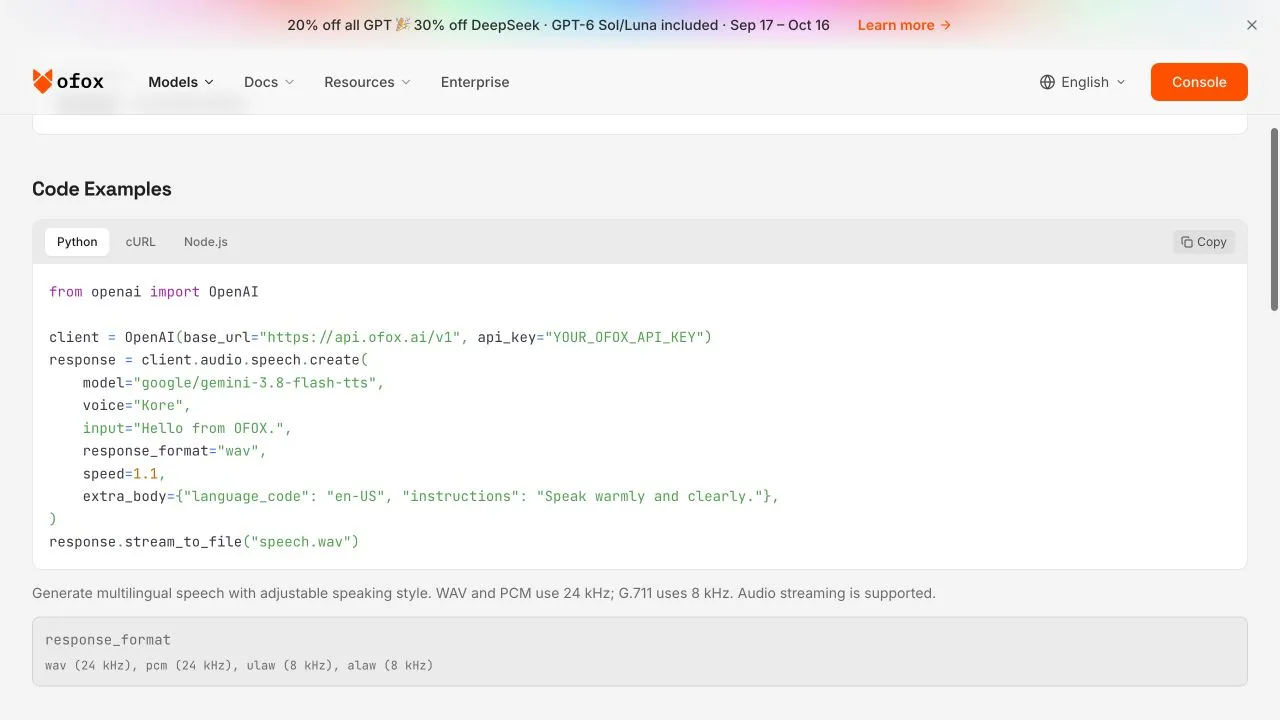
Actual model-page screenshot from October 9. Its displayed speed example is 1.1; the recorded requests in these projects use 1.0. The screenshot proves the page’s displayed integration example, while the saved response metadata and audio document the successful requests.
A Japanese request has this shape. The Korean request substitutes the approved Korean text and ko-KR; do not leave the Japanese language code in a copied example.
import os
from pathlib import Path
import requests

payload = {
    "model": "google/gemini-3.8-flash-tts",
    "voice": "Kore",
    "input": "次に、ドキュメントがどこにあるかを案内します。",
    "language_code": "ja-JP",
    "speed": 1.0,
    "response_format": "wav",
}
r = requests.post(
    "https://api.ofox.run/v1/audio/speech",
    headers={"Authorization": "Bearer " + os.environ["OFOX_API_KEY"]},
    json=payload,
    timeout=(15, 120),
)
r.raise_for_status()
if not r.headers.get("content-type", "").startswith("audio/"):
    raise RuntimeError("Expected audio; inspect the response")
Path("ja-line-3.wav").write_bytes(r.content)
Use an environment variable for the key, never a browser-side script or shared project file. The full client from the first tutorial checks media tools, records safe response metadata and does not automatically retry paid POST requests. A timeout is uncertain, not proof that the service did no work: inspect request status and usage before sending another request.
All ten new requests returned HTTP 200. Their outputs were mono 16-bit PCM WAV at 24 kHz and passed full decoding. That establishes successful generation for these inputs and dates, not a guarantee of identical output on a future run. Keep request parameters, generation time and the audio hash together. Different voices or future output may have different timing.
4. Compare actual durations before editing
The following measurements cover the complete WAV, including any silence. They are not word boundaries. Use ffprobe to check the actual file rather than estimating from text length.
ffprobe -v error -show_entries stream=codec_name,sample_rate,channels \
-show_entries format=duration -of json ja/line-1.wav| Scene | English WAV | Japanese WAV | Korean WAV | Original scene |
|---|---|---|---|---|
| Clear brief | 3.56 s | 5.32 s | 4.68 s | 4 s |
| Model catalog | 4.64 s | 4.80 s | 4.72 s | 7 s |
| Documentation | 3.44 s | 3.80 s | 4.28 s | 7 s |
| API reference | 4.96 s | 6.12 s | 6.76 s | 7 s |
| Final reminder | 5.44 s | 5.48 s | 5.64 s | 5 s |
The opening scene already fails a naive reuse of the English timing. The Japanese voice alone lasts 5.32 seconds against a four-second original scene, before allowing time to see the card. The Korean API sentence also needs more room once its lead-in and end gap are included.
Do not generalize these five samples into “Japanese is slower” or “Korean always needs more space.” Wording, voice, punctuation and output variation all affect duration. The useful conclusion is narrower: measure each take and make an explicit editorial decision for the scene it accompanies.
5. Build a separate timeline for each language
The source cuts are at 0, 4, 11, 18, 25 and 30 seconds. Our assembler retains the five scenes in that order and computes a new length for each scene. It allows 0.35 seconds before speech begins and at least 0.65 seconds after the WAV ends. If more time is needed, it holds the last frame of that scene; it never accelerates or truncates the voice.
At 30 frames per second, the rule is:
scene_frames = ceil(max(original_scene_seconds, wav_seconds + 1.0) * 30)
scene_seconds = scene_frames / 30
speech_start = cumulative_scene_seconds + 0.35
Rounding up to a whole frame explains why a duration can differ slightly from a simple decimal sum. The exported English version is about 32.03 seconds, Japanese 33.97 seconds and Korean 34.13 seconds. The English file is intentionally not byte-for-byte identical to the first tutorial’s 32-second export: this article uses the same per-scene rule for all three languages.
Install Python 3, FFmpeg and ffprobe. Unzip the project, then run:
python3 assemble_localized.py en source.mp4 rebuilt-en
python3 assemble_localized.py ja source.mp4 rebuilt-ja
python3 assemble_localized.py ko source.mp4 rebuilt-ko
Each output folder contains narrated.mp4, narration.wav, timing.json and probe.json. The timing report records the old source interval, new scene duration, added hold, speech start and end, and WAV hash. Use fresh output directories so an earlier export is not overwritten accidentally.
This policy works for a screenshot demo because a short still-frame hold preserves the visible reference. It is not automatically appropriate for people speaking to camera, cursor movements or a fast action sequence. In those cases, regenerate or re-edit the relevant visual section. A held frame preserves pixels; it cannot make mouth movements match a new language.
6. Verify the export and the language separately
The three exports contain H.264 video and AAC audio. The local checks compare their stream durations with the planned timeline and fully decode each file:
ffprobe -v error -show_streams -show_format -of json rebuilt-ja/narrated.mp4
ffmpeg -v error -i rebuilt-ja/narrated.mp4 -f null -
Check the longest sentence and every extended scene visually. The reference remains an English interface, so a Japanese or Korean voice should explain the task without claiming that the displayed labels have changed language. Keep that scope clear in the video’s distribution copy too.
Technical validation is not a pronunciation review. Listen through the exported audio, particularly “API,” product names, sentence endings and the transition into the next scene, before using an adapted version in a campaign. This report has no human listening panel and makes no claim that these voices are native-quality or better than another provider. The downloadable MP4s expose the actual outputs for evaluation.
A transcript from another model can help spot suspected omissions, but it is not authoritative proof of what was said. Preserve the original approved script and flag disagreements for listening. Word-level captions require a separate alignment or transcription step with verified timestamps; this sentence-level schedule cannot supply them.
7. Keep revisions and costs attributable
When one localized sentence changes, generate a new version of that sentence, measure it and rebuild that language’s whole timeline. Do not overwrite the old WAV while keeping its old hash or timing report. Keep a small release record listing script version, model parameters, source footage date and final artifact hash.
The three exported lengths are not three bills. English speech was reused, while Japanese and Korean added ten actual generation requests. We have not reconciled those requests against settled charges, so there is no total-cost or savings claim. Check the current model’s billing units and your request records before extrapolating a larger localization batch.
If a request fails, separate gateway authentication, provider quota, audio decoding and timeline errors. A provider-side quota response must not be automatically diagnosed as an empty Ofox wallet. If audio generation succeeds but assembly fails because the source is not 30 seconds or a WAV has a different PCM format, fix the local input contract rather than repeatedly paying to regenerate the same narration.
Start with one localized sentence that contains your difficult terminology, validate the actual output, and only then expand the project. The reusable deliverable is the set of approved texts, saved audio and language-specific timing reports—not a claim that one master timeline can fit every language unchanged.
Frequently Asked Questions
- Can I reuse the English timeline for Japanese and Korean?
- Use it as a starting reference, then measure the generated files. Our first sentence lasted 3.56 seconds in English, 5.32 in Japanese and 4.68 in Korean, so the original first scene needed different extensions.
- Does the download reproduce the videos without API charges?
- Yes. It includes the saved audio and source video. Rebuilding with FFmpeg is offline; generating new speech requires a key with access and available credit.
- Are these fully localized product videos?
- They have localized narration over the same historical English interface. They do not include localized interface screenshots, localized on-screen title cards, word-level subtitles or lip-sync.