DeepSeek Harness (dsh) Setup: Run Any Model in It (2026)
DeepSeek Harness runs as a web app, not a TUI. Install it, point it at any OpenAI-compatible gateway, and know what breaks first. Tested 2026-08-14.
 Ofox
Ofox 
September 10 update: Flash names and image validation
The official V4.1 Flash release now recommends deepseek-flash for direct API calls. Before changing a Harness model entry, check the configured provider and protocol; official alias changes do not establish how a custom gateway maps its model IDs. Use the API setup checklist to separate the endpoint, credential and model.
A report in DeepSeek Harness discussion #5267 describes MODEL_DOES_NOT_SUPPORT_IMAGES with a temporary V4.1 beta identifier in the v0.1.5-alpha.1 Web UI. It points to the distinction between a model’s actual visual capability and the client’s capability metadata. This is a version-specific user report, not our reproduction or proof that the formal release has the same bug.
If images fail while text works, record the installed Harness version, selected provider/model, protocol and sanitized error. Check the current Harness documentation and release notes before applying a workaround from an older discussion. A text-only test cannot validate the image path. The August test results below remain historical and have not been rerun against V4.1 Flash.
Current setup entry points (September 9, 2026)
The npm registry currently reports 0.1.2-rc.1. The August 14 timings, screenshots and failures below describe 0.1.0-rc.6; they are historical test results, not measurements of today’s release. This section reflects the current official documentation; the walkthrough below preserves the August 14 test.
npm view @deepseek-ai/dsh version
npx @deepseek-ai/dsh@0.1.2-rc.1 web
Open the local URL printed by the launcher, then use Settings → Models → Add a custom provider. Match the base URL, API protocol, key and exact model ID. Selecting a model also sets the default for new sessions; existing sessions retain the model recorded in their logs. Adding a provider alone does not switch an existing session.
The current provider guide supports model discovery, but discovery depends on the endpoint and protocol; enter IDs manually if needed. The launcher reference also documents headless, sdk, sdk-minimal and acp profiles. See version and upgrade checks before changing a working installation.
For a configuration error, first inspect the selected session model and protocol, then the key and provider catalog. Text generation alone does not verify tool interactions. The remainder preserves the original August 14 walkthrough; its “no tags”, interface and package-version statements should be read with that date, not as a current release inventory.
DeepSeek shipped its own agent harness on 2026-08-13, and the first surprise is that it opens in a browser rather than a terminal.
What you get:     an agent harness where every capability is a swappable plugin
Time required:    ~2 min cold install, ~25 s per warm headless run
What you need:    Node.js, one API key, a scratch directory
Install:          npx @deepseek-ai/dsh@0.1.0-rc.6 web  →  http://127.0.0.1:3080
Version tested:   0.1.0-rc.6, macOS, Node 24.14.1, 2026-08-14
Licence:          MIT, TypeScript, built on the Cordis plugin kernel
Status:           developer preview; breaking changes promised in the README
Other models:     yes, via a custom provider or two env vars
The name showed up first in DeepSeek’s 2026-07-31 change log: the V4-Flash Code Agent benchmark numbers were produced, per its own footnote, “using the DeepSeek Harness minimal mode (to be released soon) as the framework”. Nothing published says the rc you install today is that exact build, but this is that project arriving in the open. Everything below was run on a clean machine on 2026-08-14 rather than read off the README.
What Can You Do After This Setup, and What Can’t You?
You get a working local agent with a browser UI, a scriptable headless mode, and models compatible with the configured protocol and required tool interactions. You do not get a terminal UI, a stable API, or something you should point at production code this week.
Working in the August 14 test:
- A local web app at
127.0.0.1:3080with sessions, workspaces and a permission prompt before privileged operations. dsh --profile headless "your job"for one-shot scripted runs that print the final answer and exit.- Any OpenAI-compatible, OpenAI-Responses or Anthropic-Messages endpoint as a model source.
- A Python SDK on PyPI that bundles the runtime, so the calling machine needs no Node.js.
- A plugin system where models, tools, skills, sessions, sandboxes, storage, scheduling and the UI itself are all replaceable.
Limitations recorded on August 14:
- No interactive TUI. The launcher is a CLI, but the interactive surface is the browser.
- No stable interfaces. The README warns, in capitals, that there will be compatibility-breaking changes.
- No releases or tags on the repository as of 2026-08-14, so “latest” means whatever
npxresolves. - No GitHub issues. The issue tracker is switched off; bug reports go to Discussions or Discord.
Should You Install DeepSeek Harness Yet?
Install it if you want to build on the plugin architecture. Skip it if you want an agent that gets work done today.
When to use it:
- You are writing an agent plugin or evaluating harness architectures, and Cordis composition is the reason you are here.
- You want DeepSeek’s own reference framework for reproducing its Code Agent benchmark setup.
- You run agents in a browser-first or shared-server setup where a web UI is an advantage rather than a compromise.
When not to use it:
- You work over SSH on a remote box. This is the loudest complaint in the project’s own discussions, there is no TUI to answer it, and serving the UI on
0.0.0.0means also declaringtrustedHostsor the API layer refuses every request that does not arrive as loopback. - You need a harness that will not break under you. A developer preview with no tags and rapid rc churn is the opposite of that.
- You just want DeepSeek models inside an agent you already trust. Point your existing tool at the DeepSeek API instead; nothing in this post is required for that.
Stop rule: if all you wanted was DeepSeek models in a coding agent, stop after reading the env-var section below and go back to whatever you were using.
What Do You Need Before Installing?
Node.js, a key, and a directory you do not mind it writing to.
| Requirement | What we used | Notes |
|---|---|---|
| Node.js | 24.14.1 | The package declares no engines field, so there is no stated minimum |
| Package manager | npm 11.11.0 via npx | pnpm only needed for the from-source path |
| Disk | ~1 GB in the npx cache | The published tarball pulls 61 direct dependencies |
| RAM | 1.1 GB resident, idle | Measured with one session open and nothing running |
| API key | any DeepSeek-compatible key | Or any provider you add by hand |
One thing to decide before you start: the directory you launch from becomes the default workspace root. Start in a scratch checkout, not in the repository you care about.
How Do You Install DeepSeek Harness?
Separate package installation from startup. The timings below are historical measurements, not a startup guarantee for the current release.
Step 1: Run the web profile
This command pins the version used in the August 14 test. It does not claim that this historical release is the latest or the recommended production version. Check the version and stability guide before choosing a newer build.
mkdir ~/dsh-scratch && cd ~/dsh-scratch
npx @deepseek-ai/dsh@0.1.0-rc.6 web
Expected result, eventually:
dsh web: http://127.0.0.1:3080That single line is the entire console output on a successful first run, apart from one npm deprecation warning. On 0.1.0-rc.6 it took roughly two minutes from command to open port, during which the process sat at 100% of one core and printed nothing at all. There is no progress indicator, and later builds are slower, so if you kill it at 60 seconds assuming it hung you were early. The next section covers how to tell slow from stuck.
What if npx @deepseek-ai/dsh web never prints anything?
Silence is the normal state for this command, which makes a real hang hard to spot. There is no spinner, no download progress, no “starting” line. You get one line at the end or nothing at all, so the only way to tell a slow boot from a dead one is to look at the process rather than the terminal.
Two checks, both instant:
# Is the port up yet? 000 means no HTTP response was obtained; inspect curl errors too.
curl -s -o /dev/null -w "%{http_code}\n" http://127.0.0.1:3080/

# Is the process doing work, or parked?
ps -o %cpu,rss,etime -p "$(pgrep -f 'dsh.*web' | head -1)"
CPU usage alone cannot distinguish progress from a hang. An idle process may be waiting for network or disk I/O; a busy process may be looping. Compare npm logs, child processes, memory and port status across several observations. Stop and investigate if those checks show no progress; do not wait indefinitely just because CPU usage is high.
How long is “however long”? Longer than it was, and most of the wait is npm rather than dsh. Our first run, on 0.1.0-rc.6 in mid-August, opened the port in roughly two minutes and peaked around 1.1 GB resident. Repeating npx @deepseek-ai/dsh@latest web on 2026-08-30 against 0.1.1-rc.2, on the same machine, the process was still at 100% of one core after thirteen minutes, past 3 GB resident, with nothing listening on 3080.
In the August 30 investigation, dependency installation was the observed bottleneck. npm view @deepseek-ai/dsh dist.unpackedSize dist.fileCount returns 119,971 bytes across 20 files: dsh is a thin launcher. What costs the time is resolving and installing everything underneath it. Running the install on its own in an empty directory, npm install @deepseek-ai/dsh@0.1.1-rc.2 had still not created node_modules twenty minutes in, with npm itself sitting near 3 GB resident. On that run dsh never got the chance to start at all, so treat the thirteen-minute figure above as elapsed time in an incomplete npx attempt, not a measurement of dsh’s boot.
The practical version:
- Separate the install from the boot, or you will not know which one is slow.
npm install @deepseek-ai/dsh@0.1.1-rc.2first, then run./node_modules/.bin/dsh web. Only the second command’s clock tells you anything about dsh. - Install once, reuse it.
npxre-resolves the tree on a cold cache, which is the expensive part. A project-local install you keep costs that once. - Pin the version.
npx @deepseek-ai/dsh@0.1.1-rc.2 webat least makes the run reproducible; baredshresolves to whateverlatestpoints at that day, and it has moved four times since launch. - Expect the memory. This is not a lightweight CLI. If you are on a 8 GB machine with a browser open, that matters.
Step 2: Clear the first-run notice
The app opens on an internal testing notice that says DeepSeek Harness 0.1 “remains in testing for Harness developers”. Click through it.
Step 3: Skip or supply the DeepSeek key
Onboarding asks for a DeepSeek API key and offers Configure later. Take the later option if you plan to use a different provider, which is the next section.
Step 4: Confirm where it put things
ls ~/.dsh
# profiles  storages
$DSH_HOME defaults to ~/.dsh:
| Path | Holds |
|---|---|
$DSH_HOME/profiles/<name>/ | one directory per profile, auto-created for web and headless |
$DSH_HOME/profiles/<name>/package.json | the profile manifest, with its ordered dsh.profile.bundles list |
$DSH_HOME/profiles/<name>/cordis.patch.yml | your own patch layer, applied after every bundle |
$DSH_HOME/storages/ | session and workspace state |
$DSH_HOME/settings.yaml | hand-written model settings, not created until you write it |
$DSH_HOME/.credentials.yaml | API keys, written by the Models page, never read back to the browser |
The composition order is worth knowing before you edit anything: each bundle’s patch in dsh.profile.bundles order, then the profile’s cordis.patch.yml, then $DSH_HOME/cordis.patch.yml, then any --patch overlays. Inspect the result with --dump-config rather than guessing.
How Do You Add a Custom Provider?
Settings → Models → Add a custom provider, or two environment variables if you only need the DeepSeek route re-pointed.
The form asks for five things:
| Field | Example | Constraint |
|---|---|---|
| Provider ID | ofox | Lowercase, starts with a letter, permanent |
| Display name | ofox.ai gateway | Editable later |
| Base URL | https://api.ofox.run/v1 | Editable later |
| API protocol | openai-completions | Also openai-responses and anthropic-messages |
| API key | your gateway key | Write-only; stored under $DSH_HOME |
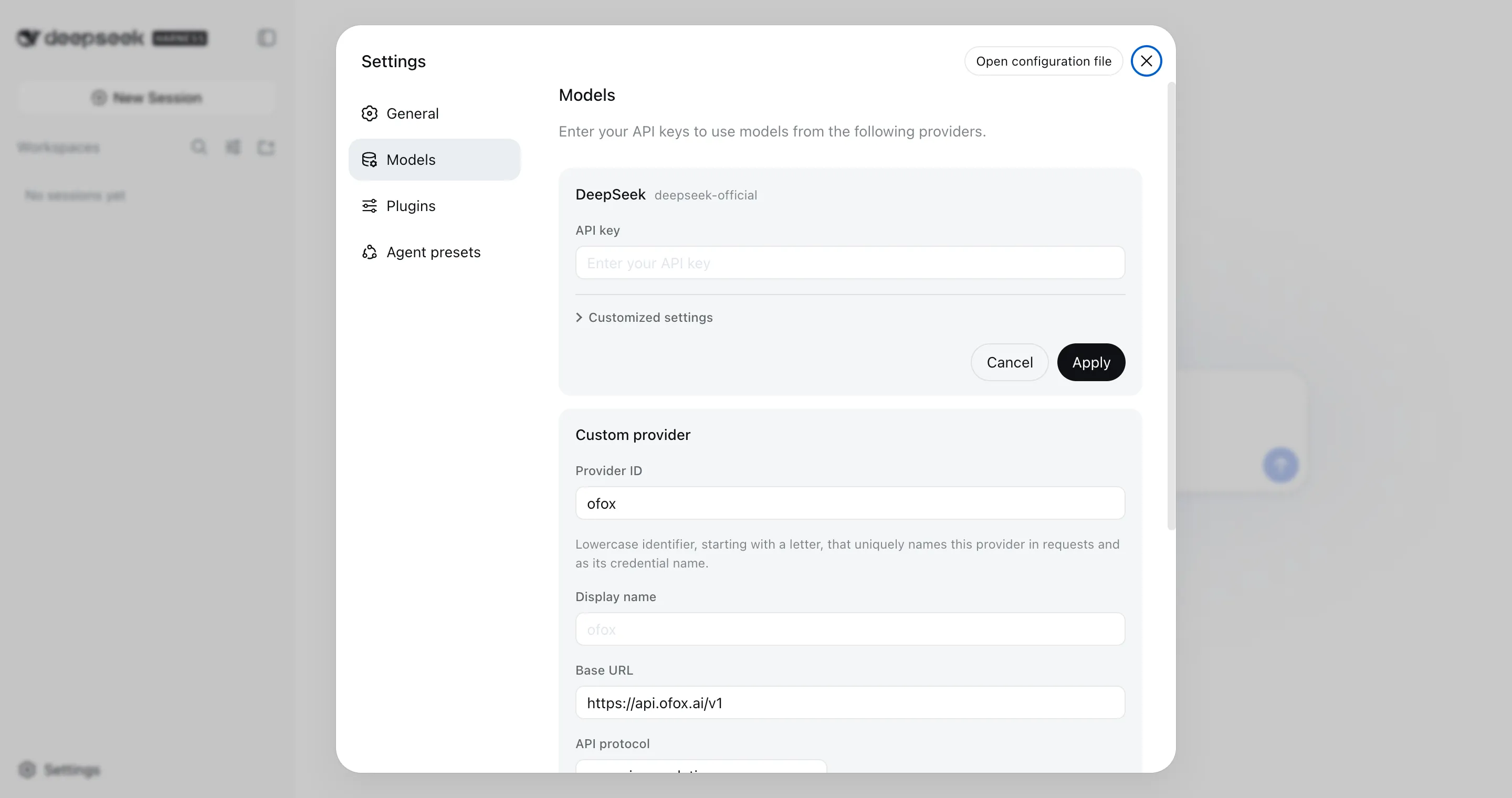
Then Fetch available models queries the base URL and key currently in the form and lets you pick from what comes back. Discovery calls the OpenAI-compatible GET /models; if your endpoint does not serve that, type the IDs in by hand.
Whichever way you fill it, the list is the whole route. A models list replaces the route’s catalog rather than extending it, and a model the route does not configure fails with UNKNOWN_MODEL before any request leaves the machine. There is no “just send it anyway” path on a custom provider.
The provider ID being permanent is the one that bites. Requests, saved sessions, model defaults and credential references all key off it, so renaming means creating a new provider and deleting the old one, and any session already recorded against the old ID stays pointed at it.
If the model you want is GPT-6 Astra specifically, the coding-agent setup guide has the same block alongside the Codex, Cursor and Cline equivalents.
The same thing in $DSH_HOME/settings.yaml, if you would rather not click:
llm-pi-ai:
  providers:
    ofox:
      apiKeyEnv: OFOX_API_KEY
      api: openai-completions
      baseURL: https://api.ofox.run/v1
      models:
        - id: deepseek/deepseek-v4-pro-0813
        - id: anthropic/claude-opus-5
Why Does a Model You Typed by Hand Refuse Images?
Because a hand-entered model is treated as text-only until you say otherwise, and the form has no field for it.
Nothing can ask an endpoint which modalities it accepts, so dsh assumes the narrow case and refuses the attachment before sending, naming the model. The fix lives in settings.yaml only:
llm-pi-ai:
  providers:
    ofox:
      models:
        - id: deepseek/deepseek-v4-pro-0813
        - id: anthropic/claude-opus-5
          input: [text, image]
Set defaultInput: [text, image] on the route instead if every model you added takes images. It is a fallback rather than an override: on a catalog provider it only answers for models the catalog does not already describe, so it will not strip images off a model that has them.
What Else Does a Hand-Typed Model Silently Assume?
Three more defaults, and images are only the one that fails loudly. A model you enter by hand carries no metadata, so the route guesses, and the guesses are documented rather than discoverable from the UI.
| What you did not declare | What dsh assumes | Declare instead |
|---|---|---|
contextWindow | 262,144 tokens, the route’s defaultContextWindow | The real window per model, or defaultContextWindow once on the route |
maxTokens | 32,768 output tokens | The real cap per model |
reasoningEfforts | the model does not reason at all | A map of the levels you want offered to the spellings the endpoint expects, e.g. high: high |
compat.thinkingFormat | guessed from the endpoint URL | The dialect your gateway actually speaks |
The last one is the subtle one for gateway users. The wire shape of a thinking request differs by vendor, and the library underneath infers it from the URL. A private gateway URL discloses nothing, so a DeepSeek-dialect endpoint behind your own domain gets addressed in the OpenAI dialect unless you say otherwise. Both compat switches exist only on openai-completions; the other two protocols carry their reasoning shape in the protocol itself.
The context-window default is the one that bites late: 262,144 is larger than most models you would point it at, so a long session builds a request the endpoint then rejects or truncates, and the harness had no reason to warn you first.
How Do You Point dsh at a Gateway Without Touching the Config?
Export two variables and the built-in DeepSeek route follows them. The apiKeyEnv for that route defaults to DEEPSEEK_API_KEY, and its base URL falls back to $DEEPSEEK_BASE_URL before the public API.
export DEEPSEEK_API_KEY="your-gateway-key"
export DEEPSEEK_BASE_URL="https://api.ofox.run/v1"
npx @deepseek-ai/dsh@0.1.0-rc.6 --profile headless "Reply with exactly this and nothing else: dsh-ofox-ok"
That is a real run from 2026-08-14, and it printed dsh-ofox-ok and exited 0 in 24 seconds on a warm cache. No settings file, no UI, no provider entry. It works because the gateway accepts the same model IDs the DeepSeek route sends: we confirmed deepseek-v4-flash and the namespaced deepseek/deepseek-v4-flash-0731 both resolve on the same endpoint.
This is the fastest way to answer “does my endpoint work with this thing” before you invest in configuring it properly.
Is There a CLI or a TUI?
There is a CLI launcher and a headless run mode. There is no interactive TUI.
The launcher’s own entry modes:
| Command | What it does |
|---|---|
dsh --profile <name> | Boot a named profile from $DSH_HOME/profiles/<name> |
dsh --profile headless "job" | Run one fresh persisted session, print the final answer, exit |
dsh web | Alias of --profile web |
dsh plugin --profile <name> <pnpm args> | Manage a profile’s plugins by forwarding to pnpm |
Launcher flags come first, and the first token it does not recognise begins the app’s own arguments, so dsh --profile web --port 8080 hands --port to the web app rather than the launcher.
headless is the mode worth knowing about, because most of the noise about the missing TUI assumes there is no terminal path at all. There is one; it just is not interactive. For CI, cron and scripted evaluation it is the right shape anyway.
“Give me something that is not a browser” is the loudest thing in the project’s discussions, which had grown to 622 threads by 2026-08-14. The top-voted one, at 74 upvotes, asks for a standalone client plus a CLI plus a VS Code extension; the thread asking specifically for a TUI is second at 24. Nothing about the agent itself out-votes the question of what it runs in.
It is also not a blind spot on DeepSeek’s side: the repository carries an internal architecture note dated 2026-07-22 on a terminal interactive extension service, so the groundwork predates the public release by three weeks.
Is There a Programmatic API?
Yes, and it is easy to miss because it is not a Node package. pip install deepseek-harness-sdk (0.1.0rc6, Python 3.10+) ships the harness runtime bundled, so the machine running it needs no system Node.js at all, and the repository carries a runnable JSON-RPC example that takes a workspace, a session directory and a prompt. It reads DEEPSEEK_API_KEY and DEEPSEEK_BASE_URL the same way the launcher does, so the two-variable gateway trick above works there too. Platform support is narrower than the CLI’s: Linux x64, Linux arm64, or macOS 14+ on arm64.
What Can You Actually Swap Out?
The bundle list in your profile’s package.json, which is where “everything is a plugin” stops being a slogan.
A profile names an ordered list of bundles, and the three that ship are published separately on npm:
| Bundle | Role | Installed by dsh 0.1.0-rc.6 | npm latest tag on August 14 |
|---|---|---|---|
@deepseek-ai/dsh-base | shared core: agent loop, tools, sessions, storage | 0.1.0-rc.6 | 0.0.1-rc.1 |
@deepseek-ai/dsh-web-app | the browser UI | 0.1.0-rc.6 | 0.0.1-rc.1 |
@deepseek-ai/dsh-headless | the one-shot run mode | 0.1.0-rc.6 | 0.0.1-rc.1 |
That fourth column is a trap rather than a curiosity. The launcher depends on ^0.1.0-rc.6 for all three, so the npx path gives you a co-versioned tree. At that time, the bundles’ latest tag pointed at 0.0.1-rc.1, published 2026-08-10, three days before the repository went public; the then-current builds sat under the next tag. Install one by hand with npm i @deepseek-ai/dsh-base and you get the pre-release one without being told. Which build you are actually running, and how to update DeepSeek Harness without breaking the co-versioned tree, is a separate write-up.
Adding a third-party plugin goes through the launcher rather than a package manager you run yourself. Per the launcher reference, dsh plugin --profile <name> forwards everything after it to pnpm inside that profile’s directory, so the pnpm grammar you already know applies:
dsh plugin --profile web add <package-name>The plugin lands in the profile’s own node_modules and resolves after the shipped bundles.
The ecosystem started faster than the software stabilised. The dsh-plugin topic on GitHub carried 775 repositories on 2026-08-14, roughly fourteen hours after the repository went public, having more than doubled from 337 in the hours we spent writing this. Quality is uneven, nothing there is first-party, and plenty of it is topic-squatting for stars, so treat the topic as a directory rather than a recommendation.
What people built first is still telling. The most-starred actual plugin is a vision bridge for text-only models at 760 stars, with a second vision toolkit at 569 — which is precisely the gap the text-only default creates for anyone routing a custom provider through a text model. The other end of the ranking is the interface complaint again: a Web UI plugin-and-skin pack at 650 stars, and community TUIs starting at 292.
What Breaks During Setup, and How Do You Fix It?
Six failures worth knowing about, four of them ours and two reported by others on day one.
| Symptom | Cause | Fix |
|---|---|---|
Two minutes of no output after npx ... web | Cold install plus first boot, no progress reporting | Wait for the dsh web: http://127.0.0.1:3080 line before assuming it hung |
MISSING_CREDENTIAL: llm-deepseek: no API key for provider route "deepseek-official" | Headless boots the DeepSeek route regardless of what other providers exist | Export DEEPSEEK_API_KEY, or set your provider as the default in the web app first |
| Attachment refused, naming the model | Hand-entered models are text-only by default | Add input: [text, image] to that model in $DSH_HOME/settings.yaml |
| Renaming a provider loses old sessions | Provider ID is permanent and sessions record it | Choose the ID once; add-new-and-delete-old is the only rename |
Cannot find package '@deepseek-ai/cordis-plugin-group' | dsh-app-boot imports it without declaring it | Reported in Discussions with a global-install workaround: install @deepseek-ai/dsh and that package globally so the flat node_modules resolves it |
Cannot find package '@deepseek-ai/dsh-client-ui-directory-picker-native' on a source checkout | Plugin tree fails to load a native directory-picker entry under pnpm dsh web | Reported in Discussions, where the same checkout booted once Node was started with --expose-internals; the npx path is unaffected |
Only fill in an API key field after you have decided which provider it belongs to. Keys go to $DSH_HOME/.credentials.yaml and the page only ever gets a redacted descriptor back, which is good practice but also means you cannot read one back out of the UI to check it.
How Do Teams Share a dsh Configuration?
Share the profile, not the credentials. A profile is a directory with a package.json naming its bundles and a cordis.patch.yml holding overrides, and neither contains a secret.
A workable split for a team on a preview-grade tool:
- Commit a profile directory: bundle list, plugin dependencies, and the patch layer with your model routes and permission defaults.
- Never commit
$DSH_HOME/.credentials.yaml. UseapiKeyEnvinsettings.yamlso each developer supplies their own key through the environment. - Pin package versions and keep the lockfile. Git tags and npm versions are separate. Record the rc version you validated and re-check after updates.
- Point everyone at one endpoint so the model list, spend and rate limits are shared rather than per-developer.
That last point is the part most teams get wrong on any harness, not just this one.
How Do You Point dsh and Your Other Agents at the Same Key?
Every agent harness makes you configure model access separately. Claude Code wants its own environment variables, Codex CLI wants a config.toml provider block, Cline wants its own settings pane, and dsh wants either a custom provider or DEEPSEEK_BASE_URL. Four tools, four places to rotate a key, four different model catalogues to keep in sync.
A gateway account can centralize access, but each client still needs its own protocol and base URL. Codex requires Responses support; Claude Code uses an Anthropic-compatible route; dsh needs the protocol selected in its provider settings. Verify the model supports that route and complete a tool interaction before sharing the configuration.
On ofox the endpoint is https://api.ofox.run/v1 with openai-completions, and the same key reaches 129 models as of 2026-08-14, including DeepSeek V4 Pro, DeepSeek V4 Flash, Claude Opus 5 and Kimi K3. For the equivalent setup in the other three tools, see our Codex CLI custom provider guide and the Cursor, Claude Code and Cline setup walkthrough.
What Should You Know Before Pointing It at a Real Repository?
That it is a preview, and that the community found permission-boundary bugs on day one.
The project’s discussions carried multiple independent reports within twenty-four hours of release about the file sandbox and the permission model, covering workspace-write boundaries, path handling races, and approval flows. We are not reproducing any of them here, and none of them are surprising for software the authors explicitly label a developer preview with breaking changes ahead.
The practical reading is not “this tool is unsafe” but “this tool has not had its permission model shaken out yet”. Two habits follow:
- Launch from a scratch directory, since the invoking directory becomes the workspace root.
- Leave the permission mode at its default and read the approval prompts rather than clicking through them.
Both are cheap. The alternative is discovering the boundary on a repository you needed.
How Does It Compare to the Harnesses You Already Use?
Different shape, same job, far less mileage. Claude Code and Codex CLI are terminal-first and have had months of hardening; at the August 14 test, dsh was browser-first and one day old, and built so that the parts you dislike are replaceable rather than forked.
The plugin architecture is the actual differentiator, and it is a real one: the model layer, the tool layer, the sandbox, the storage and the UI are all bundles composed by a loader, which is why swapping in a gateway is a form entry rather than a patch. Whether that composability survives contact with a stable API is the open question, and nobody can answer it yet.
For choosing among the mature options today, we ran that comparison in the AI coding agent harness roundup, and the terminal-agent field specifically in Claude Code vs Codex CLI vs Cursor. If you are here mainly to pick a DeepSeek model to point at whatever harness you settle on, V4 Pro vs V4 Flash covers that trade directly.
References
- DeepSeek Harness repository
dshlauncher reference- Model providers guide
dsh-llm-pi-aiadapter reference- Plugin configuration catalog
- Python SDK guide
deepseek-harness-sdkon PyPI- DeepSeek Harness official site
- Cordis plugin kernel
@deepseek-ai/dshregistry metadata- DeepSeek API change log
- Project discussions
Frequently Asked Questions
- What is DeepSeek Harness?
- An open-source agent harness from DeepSeek, released 2026-08-13, command name dsh. It is TypeScript under MIT, built on the Cordis plugin kernel, and every capability is a plugin, including the UI. DeepSeek's 2026-07-31 change log credits a not-yet-released DeepSeek Harness minimal mode as the framework behind V4-Flash's Code Agent benchmark scores.
- Does DeepSeek Harness have a CLI or TUI?
- There is a CLI launcher but no interactive TUI as of 2026-08-14. dsh --profile headless "your job" runs one persisted session, prints the final answer and exits, which is what you want for scripts and CI, and a Python SDK on PyPI covers the programmatic case. The interactive experience is the web app at 127.0.0.1:3080. A non-browser interface is the most upvoted request in the project's discussions.
- Is there a DeepSeek Harness Python SDK?
- This answer describes 0.1.0-rc.6 as tested on August 14, 2026. Yes. pip install deepseek-harness-sdk gives you version 0.1.0rc6 on Python 3.10 or newer, with the harness runtime bundled, so the machine running it needs no system Node.js. The repository ships a runnable JSON-RPC example that takes a workspace, a session directory and a prompt. Supported platforms are Linux x64, Linux arm64 and macOS 14 or newer on arm64.
- Can DeepSeek Harness run models other than DeepSeek?
- Yes. Settings, Models, Add a custom provider takes a provider ID, a base URL, an API protocol (openai-completions, openai-responses or anthropic-messages), a key and a model list. For the built-in DeepSeek route you can skip the UI entirely and export DEEPSEEK_BASE_URL at a compatible gateway.
- Why does npx @deepseek-ai/dsh web print nothing?
- A quiet terminal does not establish whether installation or startup is stuck. Separate npm installation from launching dsh; inspect npm logs, process activity, memory and the listening port over time. Neither 0% nor 100% CPU alone proves progress.
- How much memory does DeepSeek Harness use?
- About 1.1 GB resident on macOS with one idle session, measured on 0.1.0-rc.6 on 2026-08-14. Cold start from npx to a serving port took roughly two minutes at 100% of one core, with no progress output on the console until the port line appeared.
- Is DeepSeek Harness production ready?
- This answer describes 0.1.0-rc.6 as tested on August 14, 2026. No, and it says so. The README calls it a developer preview and warns in capitals that there will be compatibility-breaking changes, and the web app opens with an internal testing notice. Treat it as something to evaluate on a scratch checkout, not to point at a repository you care about.
- Where does DeepSeek Harness store its configuration?
- Under $DSH_HOME, which defaults to ~/.dsh. Profiles live in $DSH_HOME/profiles/<name>, session storage in $DSH_HOME/storages, hand-written model settings in $DSH_HOME/settings.yaml, and API keys in $DSH_HOME/.credentials.yaml. The Models page writes keys there and never returns them to the browser.
- Why does dsh headless say MISSING_CREDENTIAL when I have configured a provider?
- This answer describes 0.1.0-rc.6 as tested on August 14, 2026. Because defining a provider does not make it the default. The headless profile boots the deepseek-official route unless you change the default model, so it asks for DEEPSEEK_API_KEY even when another provider is fully configured. Either set the default in the web app first, or point the DeepSeek route itself at your gateway.
- Does DeepSeek Harness support MCP and plugins from other agents?
- Plugins are the whole architecture, and the dsh-plugin topic on GitHub is where community ones are collected. Community bridges appeared within a day, including one that migrates Claude Code, Codex, OpenCode and Pi configuration into dsh, but none of that is first-party and none of it is stable while the core APIs are still moving.