CC Switch vs Ofox Desktop: Which Should You Use?
Compare CC Switch and Ofox Desktop for Claude Code and Codex: supported platforms, provider switching, Ofox setup, billing, and checks before changing tools.
 Ofox
Ofox 
Choose CC Switch if you need to manage several API providers or work across Windows, macOS and Linux. Consider Ofox Desktop if you use an Apple Silicon Mac and want to connect supported coding clients to your Ofox account. You can also keep using CC Switch with Ofox; changing the manager is optional.
This guide is for people choosing how to configure Claude Code or Codex. Here, Ofox Desktop means Ofox’s connection manager, not the Codex desktop app or Claude Desktop. Neither manager replaces the coding client itself.
Disclosure: this article is published by Ofox. Features were checked against official documentation on September 27, 2026. This is a documented-feature comparison, not a timed setup test or a model-performance benchmark.
CC Switch vs Ofox Desktop at a glance
| Decision | CC Switch | Ofox Desktop |
|---|---|---|
| Main use | Manage and switch API providers across supported tools | Connect supported tools to an Ofox account |
| Operating system | Windows, macOS and Linux, subject to release requirements | Current public download: macOS 12+, Apple Silicon |
| Provider setup | Provider presets and custom configurations | Ofox account connection and model selection |
| Additional management | MCP, Skills, prompts, usage and local routing features | Per-tool Ofox API keys, usage and account balance |
| Before a change | Preserve the current configuration and check the selected routing mode | Keep the configuration backup created before connecting |
| Model charges | Depend on the service handling the request | Ofox API usage is billed separately from the desktop download |
Sources: CC Switch official repository and Ofox Desktop compatibility and setup. This table compares the published workflows; it does not imply that an unlisted feature is absent.
When CC Switch is the better fit
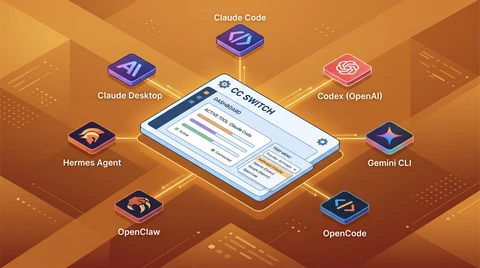
If you already maintain several provider accounts, CC Switch fits that job directly. Its official documentation describes provider presets, custom configuration, local routing with protocol conversion and failover, plus MCP and Skills management. It also documents usage tracking, so a balance or usage display alone is not a reason to switch to Ofox Desktop.
Platform support can settle the decision before feature comparisons do. CC Switch publishes Windows, macOS and Linux installation options. Ofox Desktop’s current public download does not provide Windows or Intel Mac installers. Check the CC Switch release requirements for your machine rather than assuming every Linux distribution is supported.
If CC Switch already connects your tools reliably, keep that working setup while evaluating another option. You do not need to migrate merely to use Ofox as a provider.
When Ofox Desktop is worth trying
Ofox Desktop is aimed at a narrower task: connect supported, installed coding clients to Ofox and manage their Ofox usage from one account. The published workflow is to connect the account, select a detected client, choose a compatible model and apply its configuration.
The current supported-client list includes Claude Code, Codex, Gemini CLI, OpenCode, OpenClaw and Hermes. Cline and DeepSeek Harness use the manual API guides instead; appearing in the page’s guide list does not mean Desktop configures them automatically.
If your Mac is supported and you have already chosen Ofox, that account-based workflow is the reason to consider Desktop. It is not evidence that Desktop generates better code, produces faster model responses or guarantees lower API costs.
Compare one setup before changing everything
Use one installed client and an empty test directory. Keep your existing working configuration until you have checked the replacement.
- Record the starting point. Note the client, provider, model and configuration location. Keep a backup without copying API keys into screenshots or shared notes.
- Choose one manager for the change. In CC Switch, configure the provider for that client using its official guide. In Ofox Desktop, select the supported client and apply an Ofox configuration. Avoid alternating both managers while diagnosing the same configuration.
- Start a fresh client session. CC Switch’s activation behavior differs by client and routing mode. Follow its provider-switching guide; a successful button click is not proof that an existing session changed providers.
- Send a small request and verify its destination. For Ofox, match its time, model, key and status to the request record in your Ofox account. A model’s self-description does not prove where the request went. A text reply also does not establish that tool calling works for your coding workload.
- Check your real task and rollback path. Try a small coding task only after the connection check. If it fails, restore the saved configuration before changing another variable.
For exact configuration fields, use the Claude Code integration guide or Codex model-provider guide. For the Desktop route, see the Ofox Desktop setup overview.
Questions before switching
Is Ofox Desktop a complete CC Switch alternative?
It is an option for the specific job of connecting supported clients to Ofox on a compatible Mac. A multi-provider, cross-platform workflow is a different requirement, for which CC Switch remains a relevant choice.
Can I use Ofox without Ofox Desktop?
Yes. You can use CC Switch or configure the client manually. The Ofox Codex documentation includes a CC Switch setup path. Switching API service and switching configuration manager are separate decisions.
Will switching the manager reduce my model bill?
Do not assume so. Check which provider, model and billing account will handle the same workload. A desktop download does not include unlimited model usage, and this article makes no price-saving claim.
If your priority is several providers across platforms, start with CC Switch. If it is connecting supported tools to your Ofox account on an Apple Silicon Mac, check Ofox Desktop compatibility and download it. Keep the configuration that works until the new path has passed your own request and task checks.
Frequently Asked Questions
- Is Ofox Desktop a complete replacement for CC Switch?
- No. CC Switch is a multi-provider manager for Windows, macOS and Linux. Ofox Desktop focuses on connecting supported coding clients to Ofox; its current public installer is for Apple Silicon Macs running macOS 12 or later.
- Can I use Ofox without Ofox Desktop?
- Yes. You can configure Ofox through CC Switch or follow the client-specific manual integration documentation. Desktop is an optional setup path.
- Will switching the manager reduce my model bill?
- Do not assume so. Check which provider, model and billing account handle the workload. A desktop download does not include unlimited model usage; this article makes no price-saving claim.